How to sync Shopify subscribers to Klaviyo
By Michal Krkoska16 min read
A store owner on the Klaviyo forum had a list in Klaviyo called "accepts marketing", with 5,000 more people in it than his newsletter list. Same store, same customers, same integration. His thread has almost 9,000 views, so he is not alone.
The Shopify and Klaviyo integration is easy to switch on, and it is just as easy to misread. "Connected" does not mean every subscriber in Shopify ends up on your Klaviyo list. A few settings decide who gets through, and none of them sit on the same screen.
This guide shows what the integration really syncs, the settings that decide where Shopify subscribers land, why the two tools disagree, and an ordered checklist to find one missing subscriber. Checking everything takes about 15 minutes.
What the integration syncs, and what it doesn't
First, three words that people mix up:
- A customer is anyone with a record in Shopify: they bought something, made an account or signed up with a form.
- An email subscriber is a customer who agreed to receive marketing emails. In Shopify you see this in the Email subscription column on the Customers page.
- SMS consent is a separate agreement to receive text messages. It is tracked apart from email.
When the integration is on, Klaviyo gets every customer and their orders. Your store's orders, customers and subscribers sync in real time, and product data syncs every hour. Klaviyo says this right on the integration page.
But a customer in Klaviyo is not a subscriber in Klaviyo. A customer becomes a profile (Klaviyo's word for one person's record). The profile only joins your list if Shopify says they subscribed and the sync setting is on and the list lets them in.
| Data | Does it reach Klaviyo? | What decides it |
|---|---|---|
| Customers and their orders | Yes, always, as profiles and events. | Nothing. This is on as soon as the integration is connected. |
| Email subscribers | Only if you tick the sync setting. | The setting "Sync your Shopify email subscribers to Klaviyo", the list you pick, and that list's opt-in setting. |
| SMS consent | Only after you set up text messaging in Klaviyo. | The setting "Sync your Shopify Text Message subscribers to Klaviyo", which stays greyed out until text messaging is set up. |
| Unsubscribes made in Shopify | Only if a separate setting is on. | "Sync unsubscribes to Klaviyo", which some accounts see and some don't. |
Step 1: Check the sync settings in Klaviyo
- In Klaviyo, click Integrations in the left bar.
- Under My apps, click Shopify.
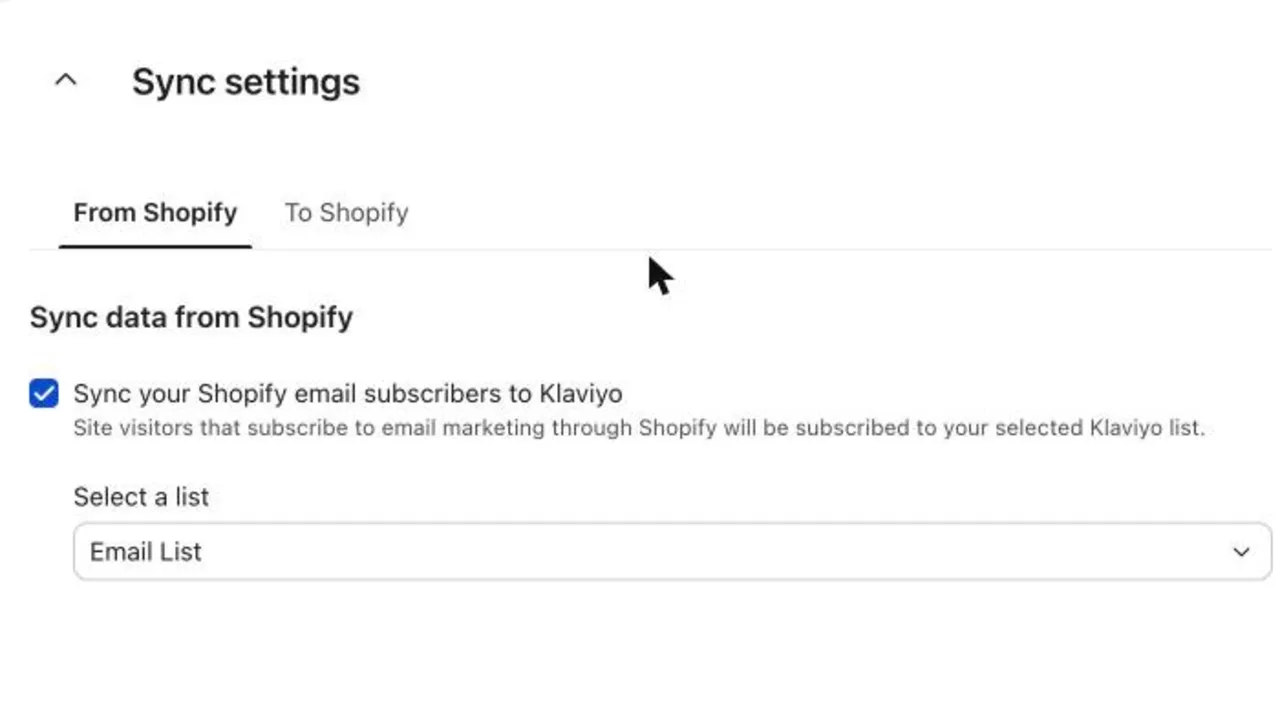
- Scroll down to Sync settings. It has two tabs, From Shopify and To Shopify. Stay on From Shopify.
Under Sync data from Shopify you see:
- Sync your Shopify email subscribers to Klaviyo. The text under it says: "Site visitors that subscribe to email marketing through Shopify will be subscribed to your selected Klaviyo list." If this box is not ticked, no Shopify subscriber ever reaches a list. That is the whole problem for a lot of people.
- Select a list. The list Shopify subscribers go into. It must be a list, not a segment (Klaviyo's guide). If the dropdown is empty, you have no lists yet. Create one under Audience, Lists & segments, Create, List, then come back.
- Sync your Shopify Text Message subscribers to Klaviyo. Greyed out in my account with the note "You must set up Text Messaging before you can collect subscribers." Until you do that, SMS consent from Shopify goes nowhere.
Some accounts also see Collect unsubscribes with a box called Sync unsubscribes to Klaviyo. If it is on, a newer unsubscribe in Shopify unsubscribes the profile in Klaviyo too. If it is off or missing, unsubscribing in Shopify does nothing in Klaviyo (Klaviyo's guide). My account doesn't show it at all.
If you change anything here, click Update Settings at the bottom right. If you only came to look, leave the page without clicking it.
Which list to pick depends on that list's opt-in setting, so read Step 3 before you choose.
Step 2: Look at the To Shopify tab too
Click the To Shopify tab. This is the sync in the other direction, and it explains a lot of the "why did Shopify change on its own" questions.
- Sync Klaviyo profiles to Shopify: when ticked, Klaviyo writes its data back into Shopify.
- Profiles: you pick one of two options.
- All profiles: "Includes profiles from imports and integrations, even if they haven't interacted with your store. Profiles that don't exist in Shopify will be created as customers."
- Profiles that already exist in Shopify: "Only profiles that exist in both platforms will be updated. No new Shopify customers will be created."
- Profile data: which data goes back. In my account it is Contact info, Email subscription, Text message subscription, Email events and Text message events.
So if someone signs up with a Klaviyo pop-up, they can show up as a subscribed customer in Shopify even though they never bought anything. That is this setting working, not a bug.
My opinion: if you import old lists into Klaviyo, choose Profiles that already exist in Shopify. Otherwise every imported contact becomes a Shopify customer, and your customer count stops meaning anything.
Step 3: Check the list's opt-in setting
This is the one that silently eats subscribers.
- Go to Audience, then Lists & segments.
- Click the list you picked in Step 1.
- Click the Settings tab, then Consent on the left.
Under Opt-in process there are two options:
- Double opt-in (Klaviyo marks it "Recommended"): "Require new subscribers to confirm their subscription before joining the list."
- Single opt-in: "Immediately subscribe people to this list without a confirmation."
The list's setting applies to Shopify subscribers too. There is no separate switch for them: for new sign-ups from Shopify, Klaviyo applies the opt-in setting of the list you picked in Select a list, and says it plainly: "If the list uses double opt-in, subscribers must confirm their subscription by email before they are added to the list" (source). Only the first historic sync is different (Step 5).
Picture what that means. A customer ticks "Email me with news and offers" at checkout. Shopify marks them Subscribed. Klaviyo sends them a "please confirm" email. They just bought something and are waiting for their order email, so they ignore it. In Shopify they are a subscriber forever. In Klaviyo they never join the list and never get your welcome series.
My opinion: the right setting depends on where the sign-ups come from.
- Single opt-in for the Shopify checkout box. These people are real buyers, and they already confirmed their address by ordering. Asking again loses people for nothing.
- Double opt-in for popups and public forms. Those attract typos and bots, and bots don't click confirmation links. I explain this in how to add a Klaviyo sign-up form.
If your store has both, keep two lists. Pick a single opt-in list in Select a list for Shopify, and let your Klaviyo popup feed a double opt-in list. Start your welcome series from the popup list. Checkout subscribers already bought, so the post-purchase flow is the one that greets them. Send campaigns to both lists: Klaviyo sends each person only one copy, even if they are on both (Klaviyo's guide).
If you'd rather keep one list, give it the setting that fits where most of your sign-ups come from. A store whose subscribers mostly tick the box at checkout picks single opt-in. A store whose list grows mostly through a popup picks double opt-in, and accepts that some buyers never confirm. If you sell in a country where you want double opt-in everywhere for legal reasons, keep it, but then expect the Shopify number to be higher than the Klaviyo number and stop worrying about the gap.
One more thing: Shopify has its own double opt-in. It is under Settings, Notifications, Customer notifications, in the Marketing double opt-in section, as a toggle called Customer marketing confirmation (Shopify's guide). If both are on, the customer can get two confirmation emails, one from Shopify and one from Klaviyo. Pick one. Mine has Shopify's toggle off.
Step 4: Check where your Shopify sign-ups come from
Klaviyo only hears about people who subscribe through Shopify itself. In Shopify there are three places that do that.
Checkout. In Shopify, go to Settings, then Checkout, and scroll to Marketing opt-in. For Email, the dropdown decides where the box is shown. Mine is set to Checkout and sign-in, and the box text is "Email me with news and offers". Below it is Preselect checkbox in certain regions, which decides where the box comes pre-ticked.
Klaviyo strongly recommends keeping the box unticked by default, because people who never noticed it drag down your email results (source). I agree.
Sign-in. With Checkout and sign-in, customers who tick the box when they create an account also subscribe.
The theme's newsletter form. Most Shopify themes have a newsletter form in the footer. It creates a Shopify customer who accepts email marketing (Shopify's guide), and the sync then sends that person to your Klaviyo list.
Now the trap. Many stores have two sign-up forms: a Klaviyo pop-up and the theme's footer form. They look the same to a visitor. They are not:
| Form | Where the sign-up goes first | Which Klaviyo list it lands in |
|---|---|---|
| Klaviyo pop-up or embedded Klaviyo form | Straight to Klaviyo. | The list chosen inside that form's settings in Klaviyo. |
| Shopify theme footer form | To Shopify, as a customer who accepts email marketing. | The list chosen in Select a list in the integration settings. |
| Shopify checkout box | To Shopify, on the customer record. | The list chosen in Select a list in the integration settings. |
| A form from another app | To that app. Some write to Shopify, some don't. | Only reaches Klaviyo if the app writes the consent into Shopify. |
If your welcome series starts from one list and the footer form feeds another, footer sign-ups "don't get the welcome email". With one list, the problem is gone. With the two lists from Step 3, the theme's footer form is a public form that lands in your single opt-in Shopify list, so I'd replace it with an embedded Klaviyo form that feeds the popup list. Then every public form goes through double opt-in and the welcome series, and only the checkout box goes through Shopify. If you are still deciding which welcome emails to send, I wrote about which Klaviyo flows to set up first.
Step 5: Understand the first (historic) sync
When you first connect Shopify, Klaviyo pulls in the past.
- It syncs the last 90 days of orders and customers first, then older data, up to 10 years by default. Klaviyo says this "can take anywhere from a few minutes to several days to finish" (source).
- You can see the state at the bottom of the integration page, under Historical data. Mine says "Your store's historical orders, customers, and products have been synced."
- Old email subscribers come across too. Klaviyo subscribes a profile if it was subscribed in Shopify, unless the profile already exists in Klaviyo. Then the newer consent wins.
- The historic sync does not send double opt-in emails and does not start list-triggered flows like your welcome series (source).
You can see this on a real profile. On one of my test customers, the subscription details in Klaviyo say Method: Shopify integration and Details: Historical Sync, and the activity log shows double_opt_in: false. So old subscribers skip the confirmation step, while new ones have to pass it if the list is double opt-in. That is another reason the two counts drift apart.
If your old subscribers are missing, don't press Re-import first. Check that the subscriber setting was ticked when you connected. If you ticked it later, look at a few profiles before you re-run anything, so you know what is already there.
Why "accepts marketing" in Shopify and "subscribed" in Klaviyo disagree
Here is every reason I know, in the order I'd suspect them:
- The list uses double opt-in and the customer never confirmed. Subscribed in Shopify, not on the list in Klaviyo.
- Shopify's own double opt-in is on. The customer is Pending in Shopify until they click Shopify's email, so there is nothing to sync yet.
- They unsubscribed in Shopify, and Sync unsubscribes to Klaviyo is off or missing. Unsubscribed in Shopify, still subscribed in Klaviyo.
- They unsubscribed in Klaviyo (from an email footer), and To Shopify writes that back. Now both say unsubscribed, but your old Shopify export still says yes.
- The profile already existed in Klaviyo during the historic sync, with a newer "no". The newer answer wins.
- You are counting an old property. Before December 14, 2022, Klaviyo used Shopify's Accepts Marketing field. It no longer decides subscription status (source), but you still see "Accepts Marketing" as a custom property on profiles. A segment built on it counts that property, not real subscribers, so it comes out bigger than your list. That is exactly what happened in the forum thread from the start of this guide. Count the list instead.
How to check one customer on both sides
When someone says "I signed up and got nothing", check that one person. It is faster than staring at totals.
In Shopify:
- Click Customers and search for the email address.
- Look at the Email subscription column. It says Subscribed, Not subscribed, or something in between like Pending.
- Click the customer. On the right, under Marketing subscriptions, you see Email if they are subscribed.
In Klaviyo:
- Click Audience, then Profiles, and search for the same email.
- On the Details tab, look at Channel consent. Next to Email it says Subscribed or something else.
- Expand it. Under Subscription details you see Status, Method (for example Shopify integration), Date, and Details (for example Historical Sync).
- Click the Lists and segments tab to see whether they are on the list.
- Click the Activity log tab. Look for Subscribed to Email Marketing and Subscribed to "Email List" (with your list's name). Click See more on the event to see where the subscription came from.
If Shopify says Subscribed and Klaviyo shows no subscription event at all, the sync didn't get it. If Klaviyo shows a consent event but no list event, the list's double opt-in is waiting for them.
The checklist: where did my subscriber get lost?
Go top to bottom. Stop at the first "no".
- Is the person in Shopify? Search Customers. If not, they signed up with a Klaviyo form or another app, not with Shopify. Check that form's list instead.
- Does Shopify say Subscribed? If it says Pending, Shopify's own double opt-in is waiting. If it says Not subscribed, the box wasn't ticked, and nothing will sync.
- Is "Sync your Shopify email subscribers to Klaviyo" ticked? Integrations, Shopify, Sync settings, From Shopify.
- Is it the list you think? Look at Select a list. Your welcome flow may start from a different list.
- Is there a profile in Klaviyo? Search Profiles. If there is none, the integration itself isn't syncing; look at Recent data on the integration page to see whether orders still arrive.
- Does Channel consent say Subscribed? If not, look at the activity log for an unsubscribe or a bounce.
- Is the list double opt-in? List, Settings, Consent. If yes, the person has to click the confirmation email before joining.
- Were they a subscriber before you connected? Then they came in with the historic sync, which never starts the welcome series. That is by design.
- Did they unsubscribe in one tool? Look at the date of the last consent change on both sides. The newer one usually wins.
In practice the answer is almost always number 3, 4 or 7.
Frequently asked questions
How long does the Klaviyo Shopify sync take?
New customers, orders and subscribers sync in real time. The first historic sync takes anywhere from a few minutes to several days, depending on how much history you have. You can see whether it has finished under Historical data on the integration page.
Will Shopify subscribers get my Klaviyo welcome series?
New ones do, as long as they land on the list your welcome flow starts from and, if the list is double opt-in, they confirm. If you keep checkout subscribers on their own single opt-in list, they don't, and that's fine: they already bought, and your post-purchase flow takes care of them. Subscribers brought over by the historic sync never do. Klaviyo deliberately skips list-triggered flows for them.
Do Klaviyo sign-ups show up as subscribers in Shopify?
Only if Sync Klaviyo profiles to Shopify is ticked on the To Shopify tab and Email subscription is one of the selected profile data. With All profiles selected, Klaviyo also creates new Shopify customers for them.
Does SMS consent from Shopify sync to Klaviyo?
Only after you set up text messaging in Klaviyo. Until then the SMS setting is greyed out. Klaviyo also notes that SMS consent only syncs if the person is subscribing to SMS in Shopify for the first time (source).
Klaviyo is not syncing with Shopify at all. What do I do?
Open the integration page and look at Recent data. If Placed Order shows recent events, the connection works and your problem is one of the settings above. If nothing has arrived in a long time, Klaviyo's fix is to reconnect the integration and confirm the update (Klaviyo's troubleshooting guide).