Klaviyo flows: which ones to set up first, and how
By Michal Krkoska16 min read
I clicked Create flow in Klaviyo and scrolled. Five "essentials" at the top, then six categories with dozens of templates: birthday flows, sunset flows, VIP tagging, price drop alerts, WhatsApp versions of everything.
A small store needs four of them. The rest can wait until you have enough customers for them to matter.
This guide gives you the order I'd build them in, and the exact setup for each one: trigger, filters, delays and what every email says. I built all of them as drafts in my own Klaviyo account, so the labels below are the ones you will see. At the end I explain why people sometimes get emails from several flows at once, and the one filter that stops it. Plan an afternoon. The clicking takes about an hour. Writing the emails takes the rest.
The four flows, in order
A flow is a series of automatic emails. A trigger is the event that puts someone into it. Here is my order:
| Priority | Flow | Trigger | Why it's here |
|---|---|---|---|
| 1 | Abandoned checkout | Checkout Started | These people were one click from paying. It makes money from day one and needs no sign-up form. |
| 2 | Welcome series | Added to list | Turns new subscribers into first-time buyers. Only works once you collect emails. |
| 3 | Post-purchase | Placed Order | Turns first-time buyers into second-time buyers, and gets you reviews. |
| 4 | Winback | Placed Order, plus a long delay | Brings back customers who stopped buying. Needs a few months of order history to do anything. |
One exception: if you already run a pop-up that promises a discount code, build the welcome series first. Your pop-up is making a promise, and right now nobody is keeping it.
Klaviyo's own list of flows to set up first puts the welcome series on top (Klaviyo's guide). For a store with real traffic and a small list, I disagree. Checkout abandoners are the closest people to money you will ever email.
Skip these until you are bigger: browse abandonment, birthday flows, replenishment reminders, VIP tagging, sunset flows and A/B tests inside flows. They are not bad. They just need volume. A browse abandonment flow on a store with 30 visitors a day sends three emails a week, and an A/B test needs hundreds of recipients before the result means anything. Your time is better spent writing four good flows than ten average ones.
Five words you need first
Every flow is built from the same parts. Learn these once and every flow makes sense.
- Trigger filter: a condition on the event that started the flow, for example "the order was over $100". Klaviyo checks it only once, when the person enters.
- Profile filter: a condition on the person, for example "has not bought since entering this flow". Klaviyo checks it when they enter and again before every email (Klaviyo's explanation). If they stop matching, they leave the flow.
- Re-entry criteria: whether someone can go through the flow more than once. You choose No re-entry, Allow re-entry or Allow re-entry after a time period.
- Smart Sending: a setting on each email called Skip recently emailed profiles. When it's ticked, Klaviyo skips that email for anyone who got any email from you in the last 16 hours (the default window). Skipped emails are not sent later (Klaviyo's Smart Sending guide).
- Draft, Manual, Live: the status of each email. Draft sends nothing. Manual puts each recipient in a Needs Review queue for you to send or cancel by hand (Klaviyo's guide to manual flow messages). Live sends.
One warning before you start. When you save the trigger, Klaviyo says: "You can not change your trigger after you save it. But you can still add or edit trigger and profile filters." If you pick the wrong trigger, you rebuild the flow. So read the trigger step twice.
Flow 1: Abandoned checkout
I wrote a whole guide on this one: how to set up an abandoned cart flow in Klaviyo. Short version: trigger Checkout Started, profile filter Placed Order zero times since starting this flow, three emails at about 2 hours, 1 day and 3 days, and no discount in the first email. Remember that filter. It comes back in every flow below.
Flow 2: Welcome series
Create the flow and the trigger
- Click Flows in the left bar, then Create flow (top right).
- Click Build your own (top right). Type a name, for example "Welcome series", and click Create flow.
- The Select a trigger panel opens on the Recommended tab. Click Added to list.
- Under Which list will trigger this flow?, pick the list your sign-up form adds people to. If you're not sure, open your form and look at which list it uses. If Shopify checkout subscribers sync into a separate list, leave that one out: they already bought, so the post-purchase flow greets them.
Klaviyo now shows Set up trigger. Leave Re-entry criteria on No re-entry. A welcome is something you get once.
Add the filter that ends the welcome when they buy
- Under Profile filters, click Add, then Add profile filter.
- In Select a condition..., choose What someone has done (or not done).
- Set Person has to Placed Order, then zero times, then since starting this flow.
- Click Save, then Save again, then Confirm and save.
The third dropdown starts on in the last 30 days. Change it. You want "they haven't bought since they joined the welcome series". The moment someone buys, they leave the welcome and the post-purchase flow takes over. Nobody gets "here's 10% off your first order" after they already placed it.
Klaviyo has a template called Welcome Series, Customer v. Non-Customer that solves the same problem with a split. The filter is simpler and does the job.
Add the emails and delays
- Click the + under the trigger and click Email.
- In Email details, write the Subject line.
- Under Settings, untick Skip recently emailed profiles for this first email only.
- Click Save.
- Click the + under the email, hover Logic and click Time delay. Type 2, leave Days, and click Save.
- Add email 2, another Time delay of 3 days, and email 3.
Every new email is created as Draft with Smart Sending switched on. On the canvas you can see it as a small Smart sending label on each email. That's why you untick it on email 1: someone who just signed up should get what you promised right away, even if a campaign went out this morning. Leave it on for emails 2 and 3.
Here is what I'd send:
| When | What it says | |
|---|---|---|
| Right away | Email 1 | Whatever the form promised: the code, the guide, the free shipping. Then two sentences on who you are. One button to the shop. |
| Day 2 | Email 2 | Your best sellers and why people buy them. Real photos, not a catalog. |
| Day 5 | Email 3 | Reviews or a customer story. If you gave a code, remind them it exists and when it expires. |
Three emails. Klaviyo's default welcome template also has three (Klaviyo's welcome series guide). More than that and you're running a newsletter, not a welcome. If you need a code, I explain creating one in how to set up discounts in Shopify.
Two things that catch people out:
- Existing subscribers don't get it. A list-triggered flow only catches people added after it's on. There's an Add past profiles button on the trigger. I wouldn't use it for a welcome. Someone who joined a year ago doesn't need "welcome".
- Importing a list into a live welcome series emails all of them. Klaviyo warns about this in its welcome series guide. Set the emails to Manual before an import.
Flow 3: Post-purchase, with first-time and repeat buyers apart
Store owners ask the same question again and again on the Klaviyo forum: "I want first-time buyers to get one email and repeat customers a different one." Here's how.
Create the flow and the trigger
- Flows, Create flow, Build your own. Name it "Post-purchase" and click Create flow.
- In Select a trigger, click the Your metrics tab, then Shopify, then Placed Order.
- Under Re-entry criteria, choose Allow re-entry. Every order should get a follow-up.
- Click Save, then Confirm and save.
You might look for a trigger filter here that means "first order". There isn't one. I clicked Add under Trigger filters and the choices are all about the order itself: Collections, Discount Codes, Item Count, Items, Source Name, Total Discounts, $value and a few more. Nothing about how many orders the person has placed. That information lives on the person, so you need a split.
Split first-time buyers from repeat buyers
- Click the + under the trigger, hover Logic and click Split.
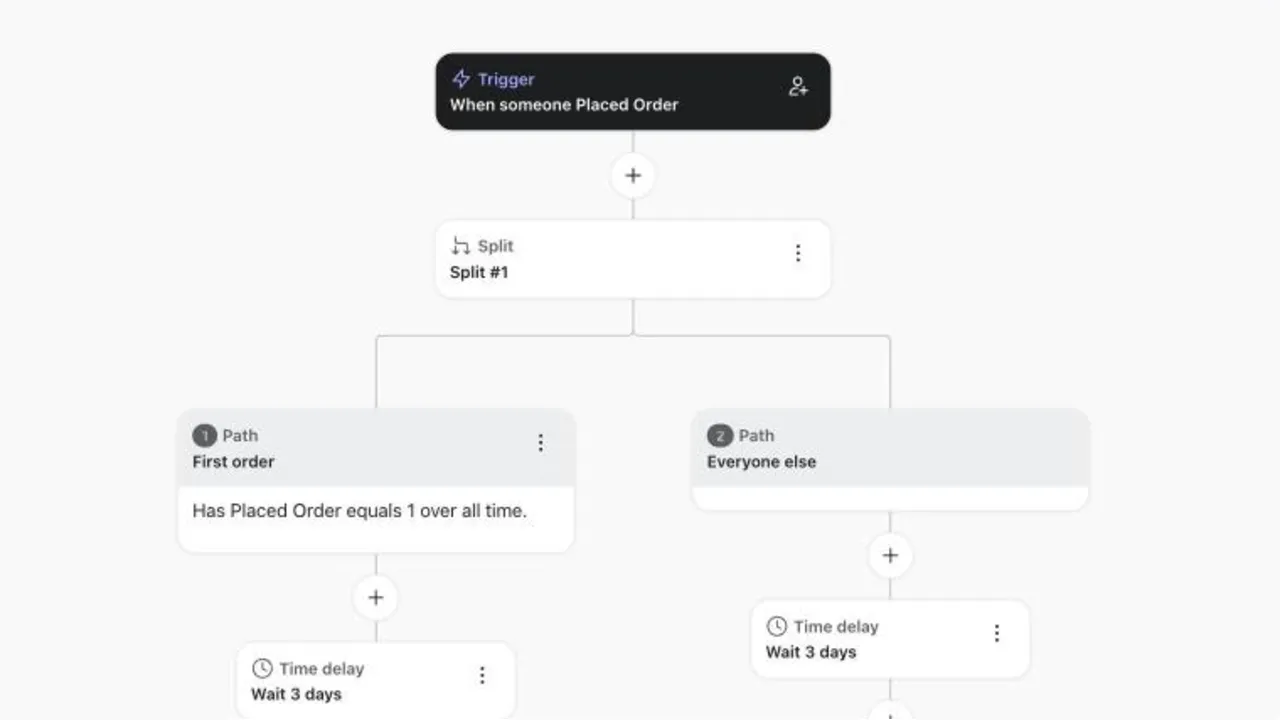
- The Split details panel says "Profiles will enter the first path where they match its criteria." You get two paths: Path #1 (checked first) and Everyone else.
- Under Path #1, click Add path criteria.
- Change Path name to "First order".
- In Select a condition..., choose What someone has done (or not done).
- Set Person has to Placed Order, then equals, type 1, then over all time.
- Click Save.
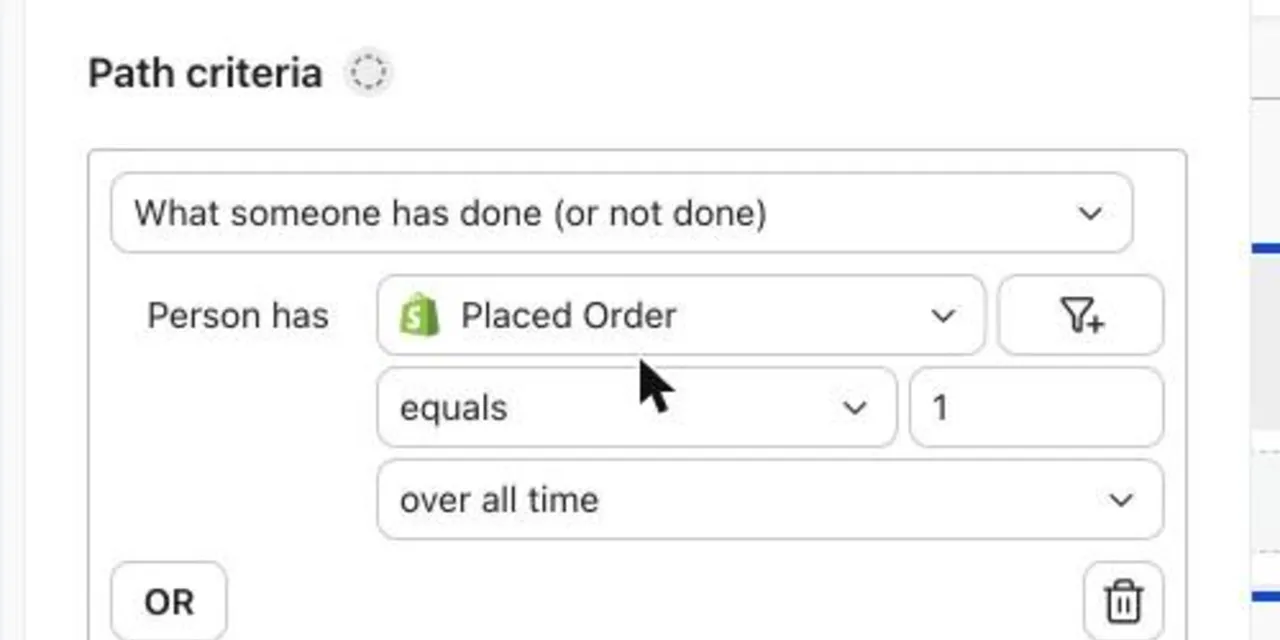
This is the filter that separates the two groups: Placed Order equals 1 over all time. The order that triggered the flow is that 1, so a first-time buyer goes left and anyone with two or more orders falls through to Everyone else.
Watch the time dropdown again. It starts on in the last 30 days. With that, a loyal customer whose last order was two months ago would count as a "first order". Use over all time.
Add the emails
Don't send anything in the first hours. Shopify already sends the order confirmation, and a second "thank you!" on top of it is noise.
| Path | When | What it says |
|---|---|---|
| First order | Day 3 | A personal thank you. How to use or look after what they bought. What happens next with delivery. "Reply if anything's wrong." No selling. |
| First order | Day 14 | Ask for a review, once the product has arrived and been used. One button. |
| First order | Day 30 | What goes well with what they bought. This is the email that earns the second order. |
| Everyone else | Day 3 | A short thank you for coming back. Shorter than the first-order version. They know you. |
| Everyone else | Day 14 | Ask for a review of this order. |
Adjust day 14 to your delivery time. Asking for a review before the parcel arrives is a classic.
Add the delays with +, Logic, Time delay inside each path, the same way as in the welcome series. Add one profile filter to the whole flow too: Placed Order zero times since starting this flow. If someone orders again while still in the flow, they leave the old run and start a new one for the new order, instead of getting two review requests for two orders in the same week.
Flow 4: Winback
Klaviyo's own winback setup uses the trigger Placed Order with a long time delay (Klaviyo's winback guide). That surprised me at first. The trick is the filter: everyone who orders enters, and the filter throws out anyone who orders again before the delay ends. Whoever is left after 90 days is, by definition, a customer who hasn't come back.
Build it
- Flows, Create flow, Build your own. Name it "Winback".
- Your metrics, Shopify, Placed Order.
- Re-entry criteria: Allow re-entry.
- Profile filters, Add, Add profile filter: What someone has done (or not done), Placed Order, zero times, since starting this flow.
- Save, Save, Confirm and save.
- +, Logic, Time delay: 90 Days. Then add the emails below with their delays.
This works because of re-entry. Every new order starts a fresh 90-day countdown, and the filter removes the person from the older one. So the winback only ever fires 90 days after their last order.
How long to wait and what to send
The delay is the only number that really matters here. Take the normal gap between two orders from the same customer, then add about half. If people usually reorder every two months, wait 90 days. If you sell something people buy once a year, wait 400. Klaviyo's built-in template waits 75 days, then 15 more for the second email.
| When | What it says | |
|---|---|---|
| Day 90 | Email 1 | "It's been a while." What's new since their last order. No discount. Plenty of people just forgot. |
| Day 104 | Email 2 | Now the offer, if you use one. Free shipping or a small code, with an end date. |
| Day 118 | Email 3 | Short and honest: "Should I keep emailing you?" with a button to update preferences. |
Klaviyo recommends keeping winbacks to three emails (same guide). I agree. After that you're hurting your deliverability for people who have made up their mind.
Why people get several flows at once, and the filter that stops it
This is the most common complaint once the flows are live: "a customer got my welcome email and my abandoned cart email and a campaign, all on the same day".
Here's what is going on. Every flow runs on its own. Klaviyo doesn't know that your welcome series and your post-purchase flow belong together. One person can join your list at 10:00, start a checkout at 10:05 and buy at 10:20. That puts them into three flows in twenty minutes.
You have three tools. They do different jobs:
| Tool | When Klaviyo checks it | What it's good for |
|---|---|---|
| Trigger filter | Once, when the person enters | Choosing which events count, for example only orders over $50. Useless for stopping overlap, because it's never checked again. |
| Profile filter | When they enter and before every email | Removing people the moment their situation changes. This is the one that stops overlap. |
| Smart Sending | Before every email that has it ticked | Spacing emails out. It skips the email if they got any email in the last 16 hours. The skipped email is lost, not delayed. |
So the answer is one filter, used everywhere: Placed Order zero times since starting this flow. Put it in the abandoned checkout flow, the welcome series and the winback flow. Then a purchase does the cleanup for you. The moment someone buys, they drop out of every "please buy" flow, and only the post-purchase flow is left. Each person is in exactly one flow that matters at a time.
Then let Smart Sending handle the rest. Leave it ticked on every email except the ones that must go out right away: the first welcome email and the first abandoned checkout reminder. Your first welcome email and a newsletter can still land on the same day. That's fine. The second welcome email will wait its turn.
What about campaigns? People often ask how to keep anyone who is still in the welcome series out of the weekly newsletter. Klaviyo has no "is in this flow" condition for segments. The accepted answer in the Klaviyo community is a workaround: add a Property update at the start of the welcome series that sets something like "In Flow = Welcome", remove it at the end, build a segment from that property and exclude it from campaigns. It works, but people who leave early (because they bought) keep the property forever unless you handle that too. My honest opinion: don't bother. With Smart Sending on, a new subscriber gets the welcome email and the newsletter on different days anyway.
Frequently asked questions
How many flows does a new Shopify store need?
Four: abandoned checkout, welcome series, post-purchase and winback. That covers someone about to buy, someone new, someone who just bought and someone who stopped buying. Add the others when you have the traffic to make them worth the work.
Can I change the trigger of a flow after I save it?
No. Klaviyo locks the trigger when you click Confirm and save. You can still add and change trigger filters and profile filters. If the trigger is wrong, build a new flow with the right one and delete the old draft.
Why didn't my existing subscribers get the welcome series?
A flow triggered by Added to list only catches people added after the flow is live. The Add past profiles button on the trigger can pull in earlier ones. For a welcome series I wouldn't do it, because a "welcome" to someone who joined months ago reads strangely.
What's the difference between a trigger filter and a profile filter?
A trigger filter looks at the event that started the flow, like the order value, and is checked once at the start. A profile filter looks at the person, like whether they've bought since, and is checked before every email. If you want someone to leave a flow when something happens, you need a profile filter.
Should I use Klaviyo's flow templates or build my own?
For these four, I build from scratch. The templates come with SMS branches, A/B tests and splits you then have to understand and delete. From scratch you know what every box does, and it takes the same time.