How to remove spam and junk URLs from Google
By Michal Krkoska16 min read
One Shopify merchant had about 4,000 pages in Google at the end of November 2022. Five weeks later Google had 1.7 million. Almost none of them were real. Spammers had created addresses on the shop with their ads in the search text, and Google happily indexed every one (the thread).
If you are here, you probably found something similar: spam pages, Shopify system URLs, old pages you deleted, or a page on someone else's site that should not show up anymore.
This guide shows you how to get them out of Google and keep them out. The clicking takes 10 minutes. The waiting takes days to weeks, depending on the route, and I'll tell you which.
Hiding a URL is not removing it
This is the one thing most people get wrong, so let me say it first.
The Removals tool in Google Search Console only hides a URL. Google's own dialog says it blocks the URL "for about six months". After that, if the page still exists, it can come back.
To remove a URL for good, the page itself has to tell Google to drop it. There are three ways (Google's list):
- 404 or 410: the page is gone. A 404 is the "not found" answer your server gives. A 410 means "gone on purpose". For Google they end up the same (Google's status code guide).
- noindex: the page stays on your site, but carries a noindex instruction that says "don't put me in search results". It can be a tag in the page code or a header the server sends.
- Password or login: Google can't see the page at all.
And one way that does not work: robots.txt. This is a small file at your site's root that tells search robots which addresses they may not visit. Google says plainly that it is not a mechanism for keeping a web page out of Google. A blocked page can still be indexed if something links to it. Worse, if you block a page in robots.txt, Google can't visit it, so it never sees your noindex tag. This exact mistake runs through every big Shopify thread on this topic.
So my rule: fix the page first, then use the Removals tool to speed things up. Never the Removals tool alone.
Which fix for which kind of URL
| What you found in Google | What it is | Permanent fix | Use the Removals tool too? |
|---|---|---|---|
| A page you deleted | An old product, an old article | Make sure it returns 404 or 410. Nothing else to do. | Only if it's urgent, for example an old price or a wrong address. |
| A page that exists but shouldn't be found | A thank-you page, a test page | Add noindex to that page. | Yes, if you want it gone now. |
| Spam search pages on your site | /search?q=spam text, /collections/vendors?q=spam text | Make sure these pages are noindex or 404, and that your theme doesn't print the search text. | Yes, with a prefix, while the permanent fix works. |
| Shopify system addresses | /web-pixels-manager@..., /wpm@..., /.well-known/shopify/monorail/... | Nothing. Shopify already sends noindex or 404 for these. | No. They drop out on their own. |
| Product links with extra codes | ?pr_prod_strat=...&pr_seq=uniform | Mostly unsolved. See the Shopify section below. | No. |
| Pages a hacker added to your site | Pages you never made | Clean the hack first, then make sure the pages return 404. | Yes, after the cleanup. |
| A page on someone else's site | A removed forum post, an old news article | You can't fix it. Use Refresh Outdated Content, or contact the owner. | You can't. The Removals tool only works on your own sites. |
Extra addresses for one real page, like a product with ?variant= or a tracking code at the end, are a different job. Don't noindex or remove those: they need a canonical tag, which Shopify already adds, and I explain how to check it in how to fix duplicate content and canonical errors in Shopify.
Step 1: Find the exact addresses
The Removals tool matches addresses exactly, including everything after the ? (Google's rules). So first collect the real URLs.
- Search Google for
site:yourshop.complus a word from the spam. For examplesite:yourshop.com coinsorsite:yourshop.com inurl:vendors. - Open each result's link and copy the address from your browser.
- Look for the pattern. If 2,000 spam URLs all start with
https://yourshop.com/collections/vendors?q=, you don't need 2,000 requests. You need one, with a prefix.
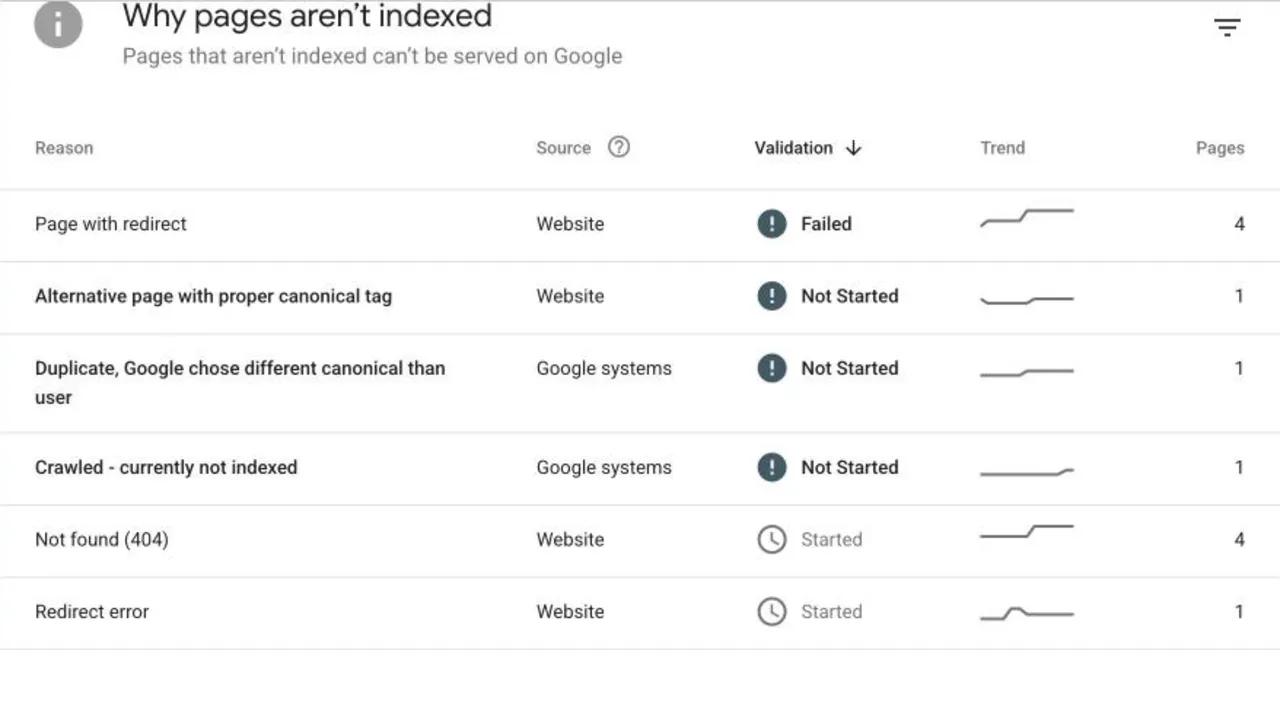
If you want to see what Google says about each address, the Page indexing report in Search Console lists it. I explained that report in how to fix pages not indexed in Google Search Console.
Step 2: Make the removal permanent
Do this before the Removals tool, not after.
For a page you deleted
Open the address in a private browser window. If you see your shop's "page not found" page, it's already returning a 404 and you're done. Google drops 404 pages from its index after it next visits them (Google's status code guide).
Don't redirect deleted junk to your homepage. A redirect means "this page moved over there". The junk didn't move. It's gone, so say so.
For a page you want to keep, but not in Google
On Shopify, Shopify's own instructions are to add a noindex tag in your theme (Shopify Help Center):
- In Shopify admin, go to Online Store → Themes.
- Next to your theme, click the ... button, then Edit code.
- In the layout folder, open
theme.liquid. - Paste this on a new line inside the
<head>section, with your page's handle:
{% if handle contains 'page-handle-you-want-to-exclude' %}
<meta name="robots" content="noindex">
{% endif %}
- Click Save.
For a single product, page or blog post there is also a no-code way in the same help page: a metafield called seo.hidden set to 1.
On WordPress or other platforms, your SEO plugin usually has a "hide from search engines" or "noindex" switch on each page.
Check that Google can see the fix
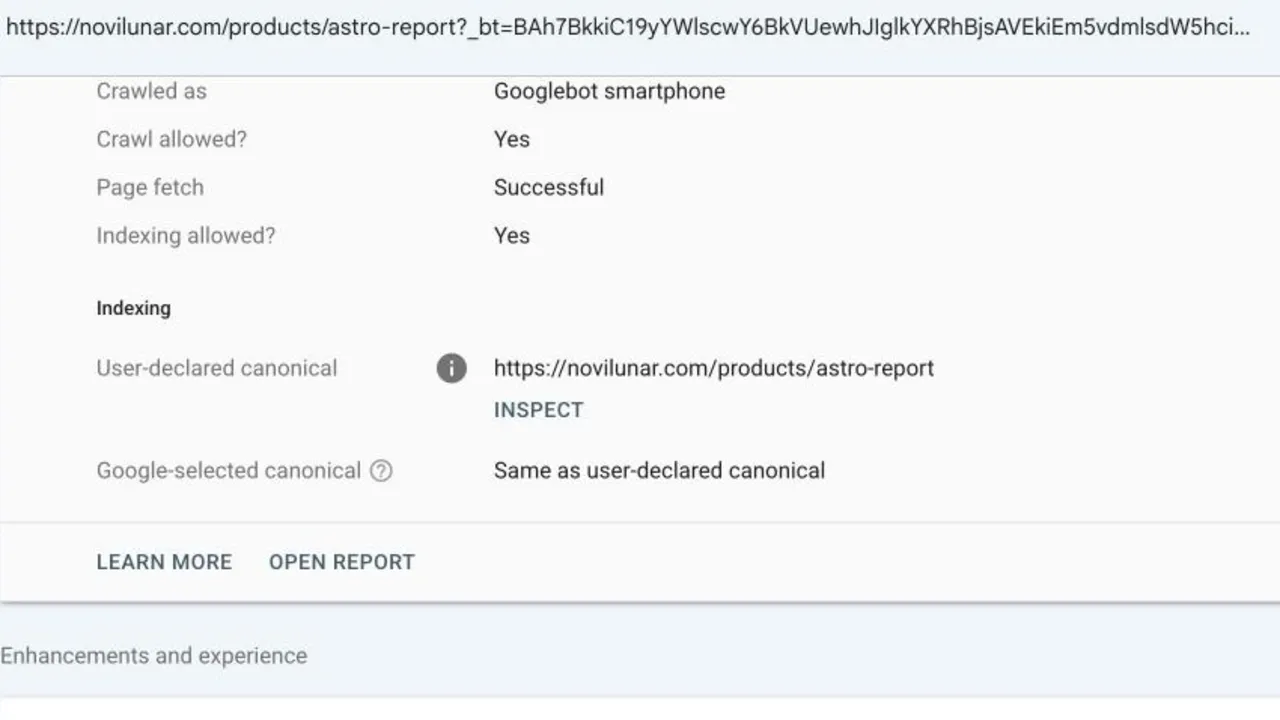
Open URL inspection in Search Console, paste the address and click Test live URL. Look at Crawl allowed? and Indexing allowed?.
- Crawl allowed? No means robots.txt blocks it. Remove that robots.txt rule for now, or Google will never see your noindex.
- Indexing allowed? No with "noindex" mentioned is what you want.
Step 3: Hide the URLs now with the Removals tool
Now the fast part. Removal requests usually take up to a day.
- Open Google Search Console and pick your site in the top left.
- In the left bar, under Indexing, click Removals.
- You see three tabs: Temporary removals, Outdated content and SafeSearch filtering. Stay on Temporary removals.
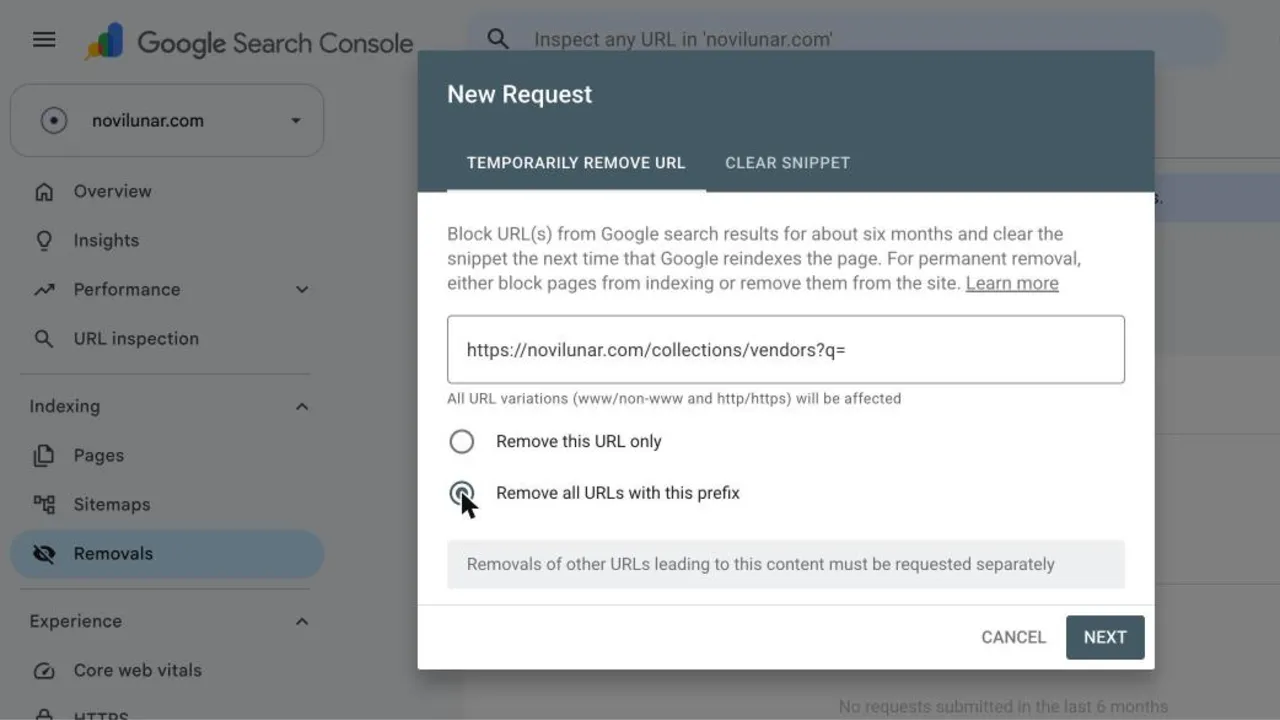
- Click the red New request button.
- A dialog opens with two tabs. Keep Temporarily remove URL.
- Paste the address into Enter URL.
- Choose one:
- Remove this URL only: for one page.
- Remove all URLs with this prefix: for every address that starts with what you typed. This is the one for spam.
- Click Next.
- Google asks you to confirm. Read the address one more time, then click Submit request.
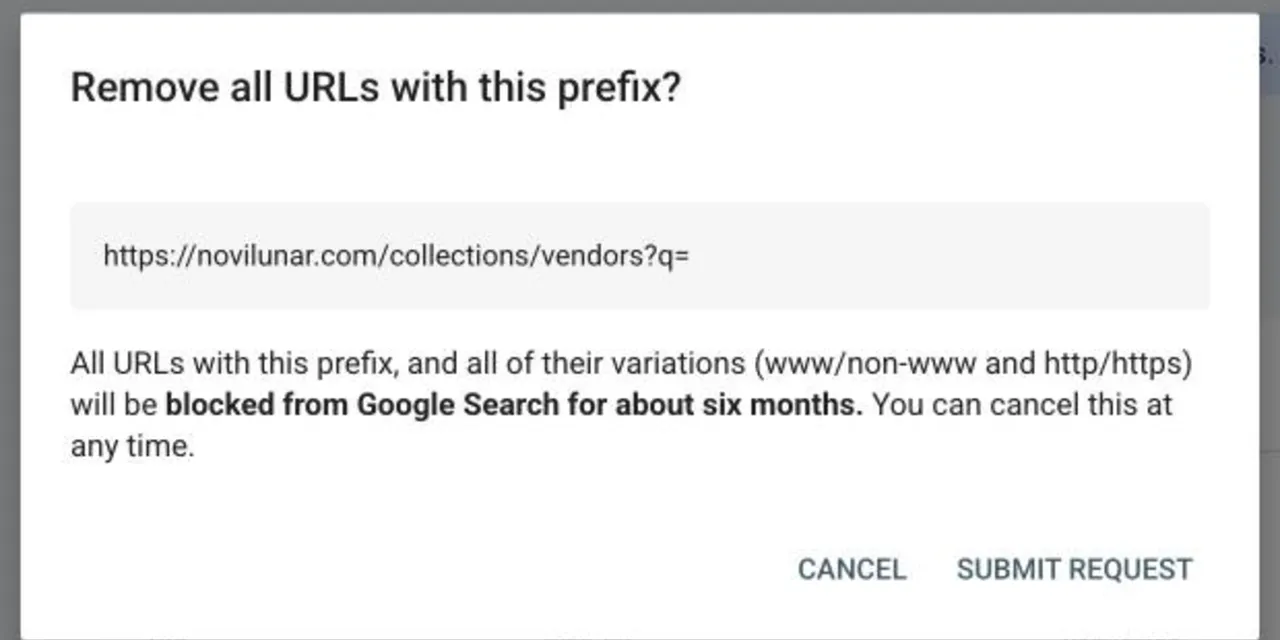
A few things the dialog tells you that matter:
- "All URL variations (www/non-www and http/https) will be affected." So you don't need four requests for one page.
- "Removals of other URLs leading to this content must be requested separately." If the same spam lives under
/search?q=and/collections/vendors?q=, that's two requests. - You can cancel a request any time. In the Submitted requests table, click the menu next to it and choose Cancel request (Google's steps).
Be careful with the prefix. https://yourshop.com/search would also hide a real page called /search-tips. Include the ? to be safe: https://yourshop.com/search?q=. And never put just your domain in there. That hides your whole site.
What "Clear snippet" is for
The second tab, Clear snippet, keeps the page in Google but deletes the short text under the title until Google visits the page again. Use it when the page is fine now but Google still shows old text, for example an old price.
You may also see a banner: "Cache updates are no longer available." Google removed its cached copies of pages, so the old "clear cached URL" option is gone. Snippet updates still work.
Step 4: Check it worked, and come back in six months
Your request appears in the Submitted requests table with a Status. You'll see Processing request first and Temporarily removed once it's live (status list).
Then search site:yourshop.com plus your spam word again. The results should be gone within a day or so.
Put a reminder in your calendar for five months from now. When the request expires, anything you didn't fix permanently in Step 2 can come back. If you did Step 2 properly, nothing will.
The Shopify spam pages: what caused them and what stopped them
Shopify merchants have fought several waves of junk URLs. Here's what each one was, what Shopify said, and where it stands.
Vendor search spam: /collections/vendors?q=
What happened. In late 2022, spammers discovered that any Shopify shop would show a page for /collections/vendors?q=anything, with "anything" printed as the page title. They created links to millions of these addresses with their ads in the text (FIFA coins were a favourite). Google followed the links and indexed the pages. Some shops reported millions of junk URLs (thread 1, thread 2).
What Shopify said. At first, support told merchants it was a link problem and to use Google's disavow tool. That was the wrong advice: disavow is for links from other sites, and it does nothing about pages on yours. On 11 January 2023 Shopify staff posted in both threads that a fix was rolling out platform-wide: unknown vendors now return a 404.
What worked. Merchants confirmed three things:
- Stop the page printing the spam text. Without that, spammers have no reason to link to you.
- noindex or 404 on empty vendor and search pages. One merchant with 2.5 million indexed junk pages wrote that almost all of them dropped within a little over a month after adding noindex.
- Remove the robots.txt block if you added one, so Google can see the noindex or the 404. Shopify staff said this explicitly.
The Removals tool with the prefix https://yourshop.com/collections/vendors?q= helped people hide the pages while that happened.
When I open a made-up vendor address on my own shop today, I land on my homepage and the spam text appears nowhere. So this wave is fixed for standard setups. If your shop still prints the text, your theme is overriding the default and needs a developer.
Site search spam: /search?q=
What happened. The same trick then moved to the shop's own search page. Merchants were still reporting new waves in 2024 in the same thread, so this one is not fully solved.
What to do. Search pages should never be in Google. On my shop, the search page already answers with a noindex header, which is the right setup. Check yours with URL inspection, as in Step 2. If Indexing allowed? says yes, add Shopify's official snippet to theme.liquid:
{% if template contains 'search' %}
<meta name="robots" content="noindex">
{% endif %}
Then hide what's already indexed with the prefix https://yourshop.com/search?q=. Merchants in the thread who keep it under control check their indexed pages once a month and remove new junk as it appears. Not elegant, but it works.
Web pixel pages: /web-pixels-manager@... and /wpm@...
What happened. In January 2023 Google started indexing blank pages from Shopify's tracking code, thousands per shop (the thread). This one was Shopify's own bug, not spammers.
What Shopify did. Shopify added noindex to these pages, then changed the address to /wpm@. Old /web-pixels-manager@ addresses now return 404, and new /wpm@ pages carry a noindex header. Shopify also removed a robots.txt block it had added, because the block stopped Google from seeing the noindex. Shopify staff said it would take weeks for everything to drop out.
What to do. Nothing. If you see these in the "Excluded by 'noindex' tag" or "Not found (404)" reports, that is the fix working. Don't add a robots.txt block for them. People who did ended up with "Indexed, though blocked by robots.txt" instead.
Monorail addresses: /.well-known/shopify/monorail/...
These show up as "Blocked due to other 4xx issue". It's Shopify's analytics endpoint, not a page, and Shopify told merchants in December 2022 that no action was needed (the thread). Ignore them.
A few merchants in that thread had Google Ads disapprove their ads over these addresses. If that happens to you, it's a Google Ads appeal, not something the Removals tool can fix.
Recommendation codes: ?pr_prod_strat=...&pr_seq=uniform
These are added to product links by Shopify's "You may also like" recommendations. Google finds them and can report tens of thousands (the thread).
Honestly, there's no confirmed fix. Many of them are only discovered by Google, not indexed, and those do no harm. The idea suggested most in the thread is to output clean product links in your theme's product card (card_product.url | split: "?" | first), which loses some recommendation tracking. People who tried robots.txt blocks reported it didn't help. If they are only discovered and not indexed, I'd leave them alone.
How to remove a page from someone else's site
You can't use the Removals tool here. It only works for sites you own in Search Console.
If the page is already deleted or changed but Google still shows the old version, use Refresh Outdated Content:
- Open the Refresh Outdated Content tool. You need a Google account, but not Search Console.
- Click New request.
- Google asks "What is the main reason you are using the remove outdated content tool?" with four options:
- To refresh Google's outdated result for a webpage that has changed: the one you want for a deleted or edited page. It leads to a form.
- To refresh Google's outdated results for a webpage I own: sends you to the Removals tool.
- To remove outdated or obsolete information on a webpage: sends you to a Google help page telling you to contact the site owner.
- To remove content permanently from Google: sends you to Google's personal content removal request.
- Pick the first option and click Next.
- Choose Page or Image, paste the URL into Enter page URL and click Submit.
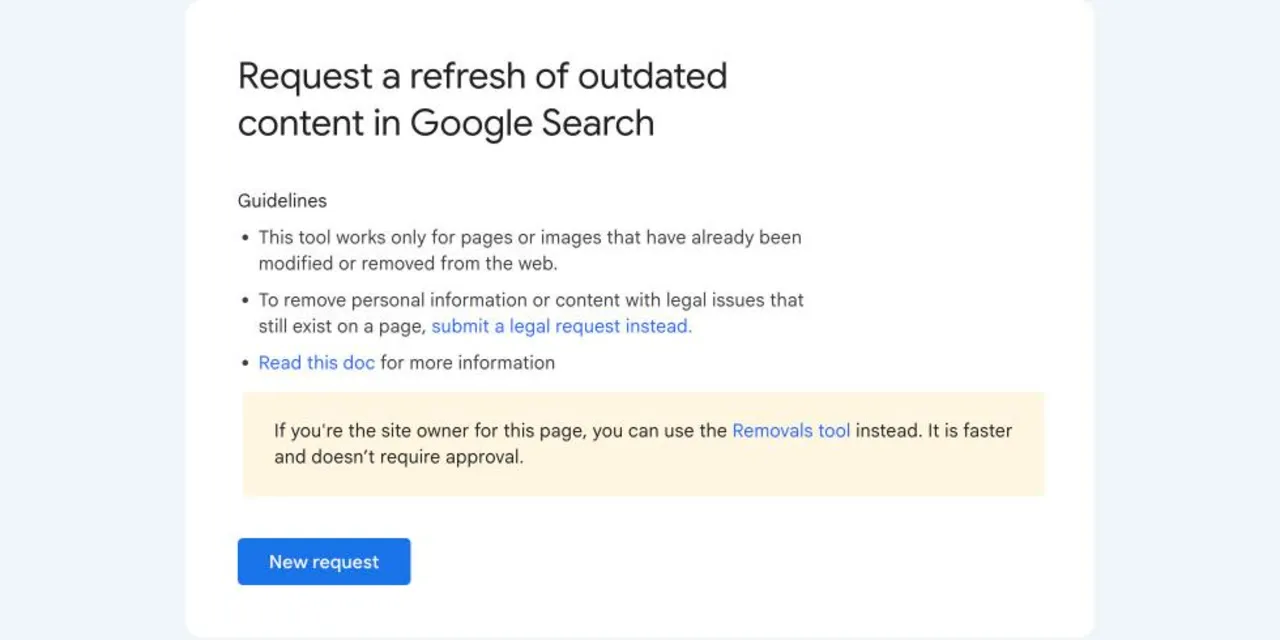
Copy the URL from the Google result itself (right-click the link, Copy link address). If the page still exists but changed, Google may ask for a word that was in the old snippet and is no longer on the page (Google's instructions).
A common case: a Reddit post about your business was removed, but Google still shows its title. The page still exists and now says the post was removed, so it counts as "changed". Use the first option and give a word from the old snippet.
Processing can take a few days.
If the page is still live, Google won't remove it just because you don't like it. Ask the site owner. If it shows your private information or breaks the law, use Google's personal content removal request.
How long each route takes
| Route | How fast it works | How long it lasts |
|---|---|---|
| Removals tool, Temporarily remove URL | Usually within a day. | About six months, then the page can come back if it still exists. |
| Removals tool, Clear snippet | Usually within a day. | Until Google visits the page again and shows the new text. |
| 404 or 410 | When Google next visits the page, usually days to weeks. | Forever. |
| noindex | When Google next visits the page. Google says this can take months for rarely visited pages. | Forever, as long as the tag stays. |
| robots.txt block | Doesn't remove anything. | Not a removal. |
| Refresh Outdated Content | A few days, after Google approves it. | Until the page changes again. An approval expires after 180 days, or sooner if the URL no longer exists. |
The fastest permanent result is both at once: fix the page and submit a removal on the same day. The removal hides it today, and the fix keeps it gone after six months.
Frequently asked questions
Will thousands of 404 pages hurt my rankings?
No. Pages that are gone should return 404, and Google says 404s for removed pages are not a problem. It only matters if your own menus and product pages link to addresses that 404. Those links you should fix.
Should I use Google's disavow tool on spam pages?
No. Disavow is for links from other websites, not for pages on your own. The spam pages are on your site, so fix them with 404 or noindex. Shopify support recommended disavow in 2022, and nobody in the threads reported that it helped.
Should I block the spam URLs in robots.txt?
Not while they're still indexed. A robots.txt block stops Google from seeing your noindex or 404, so the pages stay in Google. Once they're gone from the index, you can add the block to save Google crawling them, but on Shopify I wouldn't bother.
Does the Removals tool remove pages from Bing too?
No. It only affects Google Search (Google's note). A 404 or noindex works for every search engine, which is one more reason to fix the page itself. Bing has its own removal tool in Bing Webmaster Tools.
Can I remove a URL from Google without Search Console?
Yes, if the page is already deleted or changed: use Refresh Outdated Content, which needs only a Google account. For a page on your own site that still exists, you need Search Console access to the site.