How to get your Shopify products into ChatGPT shopping
By Michal Krkoska13 min read
I opened my Shopify admin expecting a long setup. There was none. A page called Agentic already said "You're live on Agentic Storefronts", and I had never turned anything on.
So the honest answer to "how do I get my products into ChatGPT?" is: you probably already are. The real question is whether ChatGPT will show them. That depends on your product data, and nobody outside OpenAI knows exactly how.
This guide explains what the words mean, what Shopify does by itself, which products are left out, where the buyer pays, how to check your store and how to opt out. Everything here is checked against Shopify's and OpenAI's own pages as they stood on November 20, 2026, because this topic changes every few weeks. Reading takes 10 minutes. The job itself takes about 30.
What "agentic commerce" means
Agentic commerce means a shopper asks an AI assistant to find or compare products, and the assistant does the legwork. Shopify's definition: AI agents help shoppers discover and compare products, then send them to checkout, and the shopper reviews and approves each purchase (Shopify blog, November 11, 2026).
An AI agent is just software that acts for the shopper: ChatGPT, Microsoft Copilot, Google's AI Mode and so on. Shopify Catalog is Shopify's structured copy of product data from eligible stores, which those assistants read. Shopify says it holds titles, descriptions, images, pricing, options and availability.
What Shopify does automatically, and what you do
Almost nothing is on you. Shopify says Agentic Storefronts is active by default for eligible stores, so you don't turn it on, and the Shopify Catalog includes eligible products automatically. For ChatGPT there are no extra fees beyond normal payment processing.
OpenAI says the same from its side: if you sell through Shopify or Etsy, your catalog is already integrated, with no application. That page also says ChatGPT shopping is live for US users only. It is undated, so I can only tell you what it said on November 20, 2026.
| Who | What they do |
|---|---|
| Shopify | Copies your eligible products into Shopify Catalog and keeps the copy updated. Turns ChatGPT on for eligible stores. Sends buyers to your own checkout. |
| ChatGPT | Decides whether to show your product, where, and with what wording. |
| You | Keep the data accurate, complete your policies, and decide whether you want to be there at all. |
Here is the part that matters: inclusion is not the same as being shown. Shopify says in plain words that Catalog inclusion guarantees neither placement nor a particular ranking and that each channel controls its own ranking and wording. So being in costs you nothing, and being shown is decided by your product data and by ChatGPT.
Which products are eligible, and which are not
Shopify's Catalog requirements page lists them. The short version:
| Requirement | What Shopify says |
|---|---|
| Store | A Starter plan or higher, not in private mode. Following Shopify's terms and acceptable use policy. |
| Policies | Terms of service, Privacy policy and Return and refund policy filled in under Settings, then Policies (source). |
| Product data | A title, at least one image, and a price above 0. Free products are excluded. |
| Publishing | Published to the online store (or Hydrogen or Headless). |
| Status | Not Unlisted and not hidden from search engines. |
| Selling to | For ChatGPT, your store must sell to customers in the United States. It can be based anywhere. |
| Customers | Business-to-business only products are excluded: B2B markets or catalogs, logged-in-only, password-protected. |
| Track record | Real sales, orders fulfilled, low chargebacks, invoices paid. Eligibility is reviewed over time and can be lost. |
Shopify also excludes whole categories, and subcategories too: alcohol, tobacco and vaping, drugs and smoking accessories, prescription and medical products, weapons, adult content, sexual health products, money-related products, finance and insurance, event tickets, live animals, and two that surprised me, Product add-ons and Uncategorized products. Shopify says it decides by your product information, not only the category you picked, and it can change the list. For ChatGPT there's an extra rule: products under OpenAI's "Prohibited products and services" don't appear in ChatGPT results.
Notice "Uncategorized". If your products have no category, you are asking to be excluded for no reason at all. That's the first thing to fix.
Where the buyer pays, and what it means for you
Shopify's ChatGPT page says customers complete the purchase on your online store checkout, in a ChatGPT in-app browser or a new tab on ChatGPT web, and that your customizations, branding, selling strategies and payment methods all apply. There is no direct checkout switch for ChatGPT. OpenAI's own page agrees: it is moving away from a standalone Instant Checkout, shoppers buy on merchant-owned sites, and there are no fees on purchases that start in ChatGPT.
What that means in practice:
- Your checkout is the checkout. Same payment methods, same shipping, same taxes. Nothing to rebuild.
- Discounts. Shopify's pages don't mention discounts for ChatGPT at all. Because the buyer lands on your normal checkout, a normal discount code works there like on any visit. But ChatGPT doesn't know your codes, so the shopper only sees them if they are on your site.
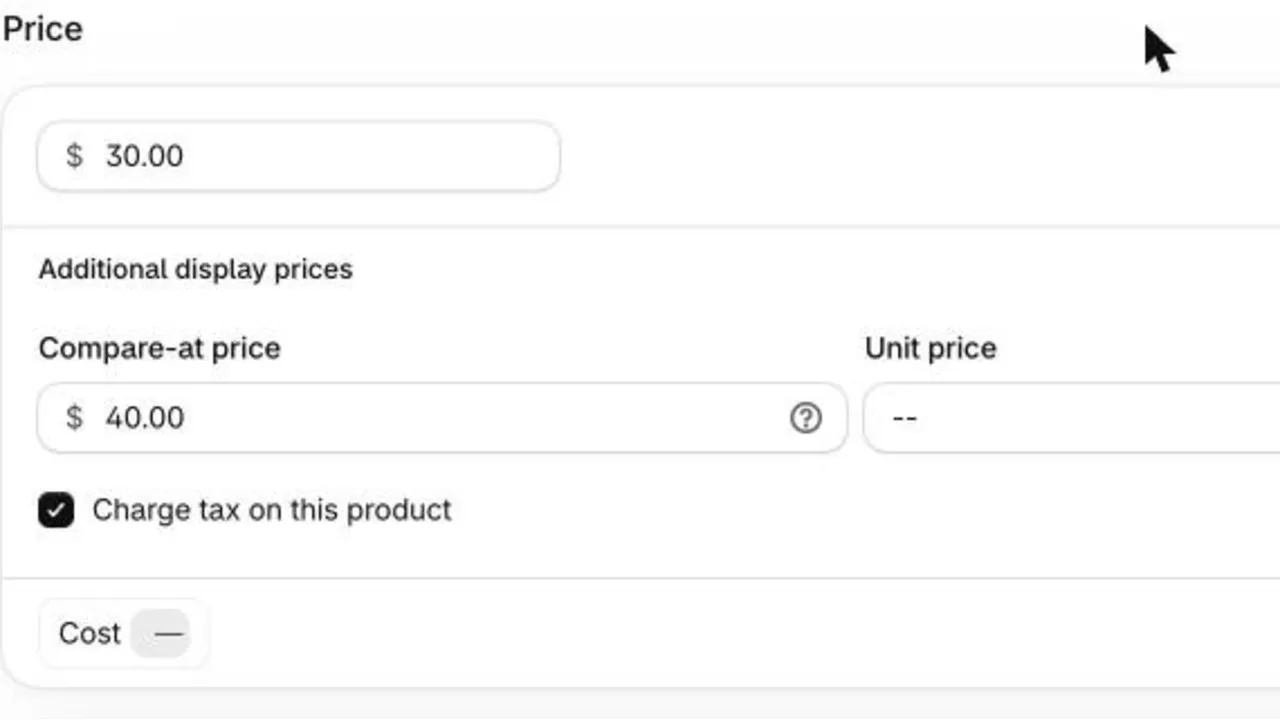
- Compare-at prices. On the Channel mapping page with Shopify Catalog selected, there's a switch: "Show compare-at prices to AI agents. Agents may use this information to advertise strikethrough pricing." Make sure they are real.
Step 1: Check that your store is included
- In Shopify admin, click Sales channels, then Agentic. (Shopify's help page says the page may be unpinned from your menu, and you can pin it again.)
- At the top, an eligible store reads "You're live on Agentic Storefronts."
- On the right, under Channels, ChatGPT should have a green dot. Click it. Mine says: "Your products are discoverable via the Shopify Catalog. Customers check out on your online store."
- Under Sources, Shopify Catalog shows your product count. Shopify says an ineligible store shows an Ineligible warning you can click to see the reason.
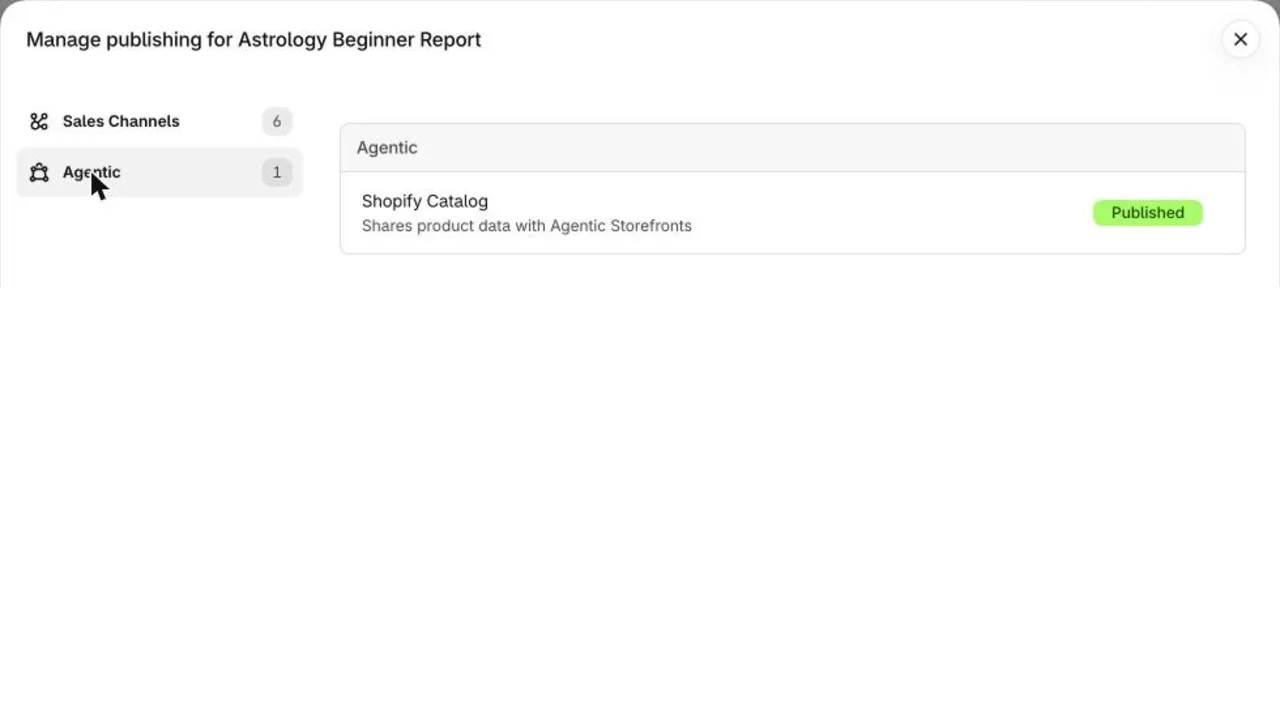
To check one product: open it, find Publishing on the right, and click the small sliders icon to open Manage publishing. There is a tab named Agentic. It lists Shopify Catalog with a status of Published. On a draft product it said Unpublished. That's the picture at the top of this guide.
That tab is a display, not a switch. I found no per-product toggle.
Step 2: Fix your product data first
This is the only lever you have. Shopify's Agentic page can show how a product might do. Under Check the Shopify Catalog, type a search a shopper might make into Enter a search query to see how you might rank. Shopify's help page says the preview shows raw Shopify Catalog results, that channels often re-rank them, and that it is a directional guide.
Each product also gets a Listing quality indicator, which looks at description completeness (word count), image coverage, verified reviews, variant and option completeness (including unclear acronyms in names), and shop policy completeness.
My order, most useful first:
- Category. Pick the most specific Shopify category. An empty or wrong one can get you excluded (see above). My product data guide shows where the category and its fields live, including one case where Shopify's suggestion was way off.
- Title. Say what the product is, in words a shopper would type. "Linen shirt, men's, slate blue" beats "The Harbor". Avoid codes and acronyms nobody knows. Shopify itself flags them.
- Description. Plain facts: material, size, who it's for, what's in the box. Shopify's ChatGPT page also says to put any legal disclosures in the first 6,000 characters of the description.
- Variants and options. Real option names (Size, Color), correct stock.
- Images. At least one per product, which is a requirement, and several clear ones.
- Identifiers. Barcodes (GTIN) where your products have them. Shopify's pages don't say ChatGPT uses them, so don't spend a weekend here for ChatGPT alone. They matter for Google, and my product data guide covers them.
- Policies. Required to be in at all. Also add facts to the Knowledge base (below).
Mapping, if your data lives elsewhere
If your best title or description sits in a metafield, open Shopify Catalog under Sources on the Agentic page and click Review your product data. Shopify's mapping page says you can pick the source for title and description. It changes only what Catalog reads, not your store.
The Knowledge base
The Knowledge base page under Agentic holds non-product facts like returns, shipping times and contact details, which AI agents can use to answer shopper questions. Shopify generates most facts from a scan of your store, and they stay unpublished until you publish them. Published content is public. Mine showed "6 of 7 published". Read it before you publish: an assistant may quote it.
What the public files on your store are for
Your store now has files made for AI agents. I looked at my own store's, as a visitor would:
/sitemap.xmlnow lists an extra sitemap,sitemap_agentic_discovery.xml, next to the usual products, pages, collections and blogs ones./sitemap_agentic_discovery.xmlcontains one address:/agents.md./agents.mdis a page written for AI agents, not for people. It says the store supports the Universal Commerce Protocol (UCP) and points to a.well-known/ucpprofile and an MCP endpoint. It asks agents to identify themselves, to get the buyer's approval before ordering and not to script checkout forms. It also recommends that agents use Shopify's Shop skill./robots.txthas comments at the top pointing to the same files, and similar requests addressed to agents. Its rules still allow normal crawling and block cart, checkout and account pages.
You didn't create any of these, and I found no setting to edit them. They tell agents how to talk to the store. I found nothing saying they affect ranking.
How to opt out
First, why you might: a store owner on the Shopify Community complained there was no opt-out (forum thread, April 2026) because their vendor contracts or their view of AI use didn't allow it. Shopify has since added controls.
To stop ChatGPT from using your catalog, Shopify's steps are:
- Click Sales channels, then Agentic.
- Turn off Allow Shopify to manage for me. (It's on by default. Shopify says it activates all channels, direct checkout and automatic enrollment in new storefronts and features.)
- Click ChatGPT.
- Turn off Shopify Catalog access.
- Click Save.
The limits, all from Shopify:
- Data can take up to 7 days to stop being shared.
- It doesn't hide your products from other Catalog users such as Shop.
- It doesn't fully hide them: ChatGPT may still reference them through web crawling and indexing.
- You can't opt out of Shopify Catalog itself, only stop channels from using it.
To hide a single product, Shopify says set its status to Unlisted. Read the warning: it also removes the product from sitemaps, Google and your store's own search. Shopify's Agentic help page also names a seo.hidden metafield as a second way, and Community posts disagree about exactly what it hides. I'd test it on one product before trusting it.
Blocking AI crawlers in robots.txt affects only the open web, not Shopify Catalog.
How to tell these visits apart in your analytics
Shopify's documentation says orders from AI channels appear in your admin with channel or referrer attribution. The Agentic page shows, per channel and for the last 30 days by default, Sales, Orders, Online store sessions and Online store conversion. Click a channel name for its breakdown. That's the number to watch.
Shopify's pages don't say how to find these visits in other tools such as Google Analytics, so here is what store owners report, labelled as forum information. In a Shopify Community thread (September to October 2026), merchants saw sessions with the referrer chatgpt.com and utm_source=chatgpt.com in the link. They also said some ChatGPT visits show up as Direct, because in-app browsers and copied links can lose the referrer, and one said GA4 may miss orders from ChatGPT's in-app browser. One poster who sells tools in this area measured about 4% of ChatGPT visits without the tag. Treat all of that as unconfirmed.
My advice: trust the Agentic numbers, then filter your other tool for "chatgpt" in the source. For the general reports, see my guide to Shopify Analytics.
What nobody knows yet
- How ChatGPT decides what to show. Shopify says only that each platform decides what to display and how to rank it. OpenAI hasn't published ranking rules that I could find.
- How much revenue it brings. Forum posts are tiny and anecdotal, and some come from people selling AI-visibility services. Shopify's help pages give no benchmarks.
If someone sells you a method to "rank in ChatGPT", ask for the source.
How much time I'd spend
Today, about 45 minutes for a small catalogue, once:
- Check on Agentic that you are live, and fix policies if they show a warning. 15 minutes.
- Give every product a specific category, a plain title and a real description. This is the long part, but it also helps Google and your own site search.
- Read and publish your Knowledge base facts. 10 minutes.
- Look at the numbers on Agentic once a month.
I wouldn't spend more, and I wouldn't buy an app for it. I'd skip llms.txt files and "AI optimisation" services, because none of the Shopify pages I read mention them. The basics cost nothing, and the same clean product data is what Google Shopping wants too.
Frequently asked questions
Do I need to install an app or apply to OpenAI?
No. The ChatGPT Business app is optional, and your products are discoverable without it.
Does ChatGPT take a fee on my sales?
Shopify says there are no ChatGPT-specific fees, only your normal payment processing fees. OpenAI's page says there are no fees on purchases that start in ChatGPT.
Can I hide a single product from ChatGPT only?
Not with a documented per-product switch, as far as I found. Shopify's options are the channel-level Shopify Catalog access switch, or the Unlisted status, which also removes the product from Google and your site search. The Agentic tab I saw on a product is read-only.
Does this work outside the US?
ChatGPT shopping is live for US users only, per OpenAI. Your store can be based elsewhere, but Shopify says it must sell to customers in the United States.