Google Ads tracking template: setup and examples
By Michal Krkoska12 min read
I wanted to see which Google Ads campaign brought each visitor to my shop. Not just in Google Ads, but also in Shopify and in my email tool, which have never heard of Google's own click ID.
So I opened the Tracking settings, pasted a template I found online, and saved. Google accepted it. Then I pasted a slightly broken one. Google accepted that too. A green checkmark tells you surprisingly little here.
This guide gives you two copy-and-paste setups that work, explains every part in a table, and shows you where people go wrong: {lpurl}, the ? and & problem, which level wins, and whether you need UTM tags at all when auto-tagging is on. It takes about 10 minutes.
The short answer
If you just want something that works, do this:
- Leave Auto-tagging on.
- Leave Tracking template empty.
- Paste this into Final URL suffix at account level:
utm_source=google&utm_medium=cpc&utm_campaign={campaignid}&utm_content={adgroupid}&utm_term={keyword}
That's it. The rest of this article explains why, and what to do if your setup is different.
The terms you need first
A final URL is the page people land on after they click your ad. For example https://novilunar.com/products/astro-report.
A Final URL suffix is text that Google adds to the end of your final URL, after a ?. You only write the part after the ?.
A tracking template is a full URL that Google builds for each click. It must contain {lpurl}, which Google replaces with your final URL. It exists for tracking tools that need the click to pass through their own server first.
A ValueTrack parameter is a placeholder in curly brackets, like {keyword} or {campaignid}. Google swaps it for the real value at the moment of the click (Google's full list).
UTM tags are the utm_source, utm_medium, utm_campaign and similar parameters at the end of a URL. Almost every analytics, shop and email tool reads them.
Step 1: Check auto-tagging before you touch anything
Auto-tagging adds a gclid (Google click ID) to every ad click. Google Analytics 4 uses it to know the exact campaign, ad group and keyword. You don't have to do anything else for Google Analytics.
- In Google Ads, click Admin in the left bar.
- Click Account settings.
- Look at the Auto-tagging row. It should say Yes.
If it says No, click it and turn it on. Do this first, whatever else you decide. Google Ads also uses the gclid to connect an order to the ad click before it, which my guide to Google Ads conversion tracking on Shopify relies on.
Do you need UTM tags if auto-tagging is on?
This is the question people argue about most, so here is the honest answer.
For Google Analytics 4: no. When a click has both a gclid and UTM tags, GA4 uses the gclid for its normal reports (Google's explanation). Your UTM values still show up, but only in the "manual" dimensions, such as Session manual campaign name. Nothing breaks.
For everything else: yes. Shopify, Klaviyo, HubSpot, most CRMs and most form tools can't read a gclid. They read UTM tags. Without them, your Google Ads orders often show up as "direct" or "unknown" in those tools.
So my opinion: keep auto-tagging on and add UTM tags. They don't fight each other. The gclid serves Google, the UTM tags serve every other tool you use.
Step 2: Choose between Final URL suffix and tracking template
Both fields live in the same box, and both can add UTM tags. Here is the difference:
| Final URL suffix | Tracking template | |
|---|---|---|
| What you type | Only the parameters, like utm_source=google | A full URL with {lpurl} in it |
| Who needs it | Anyone who wants UTM tags | People who use a third-party click tracker |
Does it need {lpurl}? | No. It can't contain it. | Yes, always, at account, campaign and ad group level. |
| Risk of breaking clicks | Very low. Google adds it to the final URL. | Higher. One typo and your tracking or landing page breaks. |
| My recommendation | Use this for UTM tags. | Leave it empty unless a tool asks for it. |
Google's own pages split the jobs the same way: the Final URL suffix holds parameters attached to your landing page (Google's suffix page), and the tracking template holds tracking information for click measurement (Google's tracking page).
Step 3: Add the Final URL suffix (the setup I recommend)
- Click Admin, then Account settings.
- Click the Tracking row. It says No options set if it's empty.
- Leave Tracking template empty.
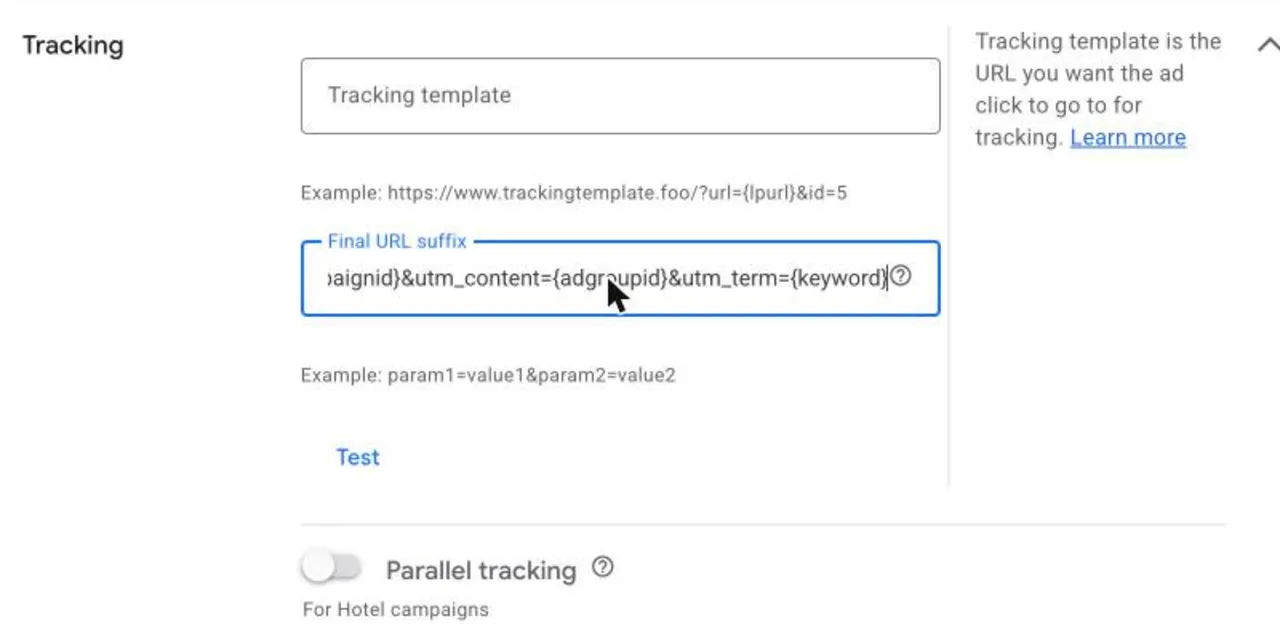
- In Final URL suffix, paste:
utm_source=google&utm_medium=cpc&utm_campaign={campaignid}&utm_content={adgroupid}&utm_term={keyword}
- Click Save. The Tracking row now says Using URL tracking options.
Here is what each part does:
| Part | What it does | Example value after a click |
|---|---|---|
utm_source=google | Tells your tools the visitor came from Google. | google |
utm_medium=cpc | Tells your tools it was a paid click, not organic search. GA4 (its channel rules) and most tools recognise cpc as paid. | cpc |
utm_campaign={campaignid} | Google fills in the campaign's ID number. | 281499447087316 |
utm_content={adgroupid} | Google fills in the ad group's ID number. | 281677879161571 |
utm_term={keyword} | Google fills in your keyword that matched the search. | astrology report |
& | Separates one parameter from the next. Use it between every pair. |
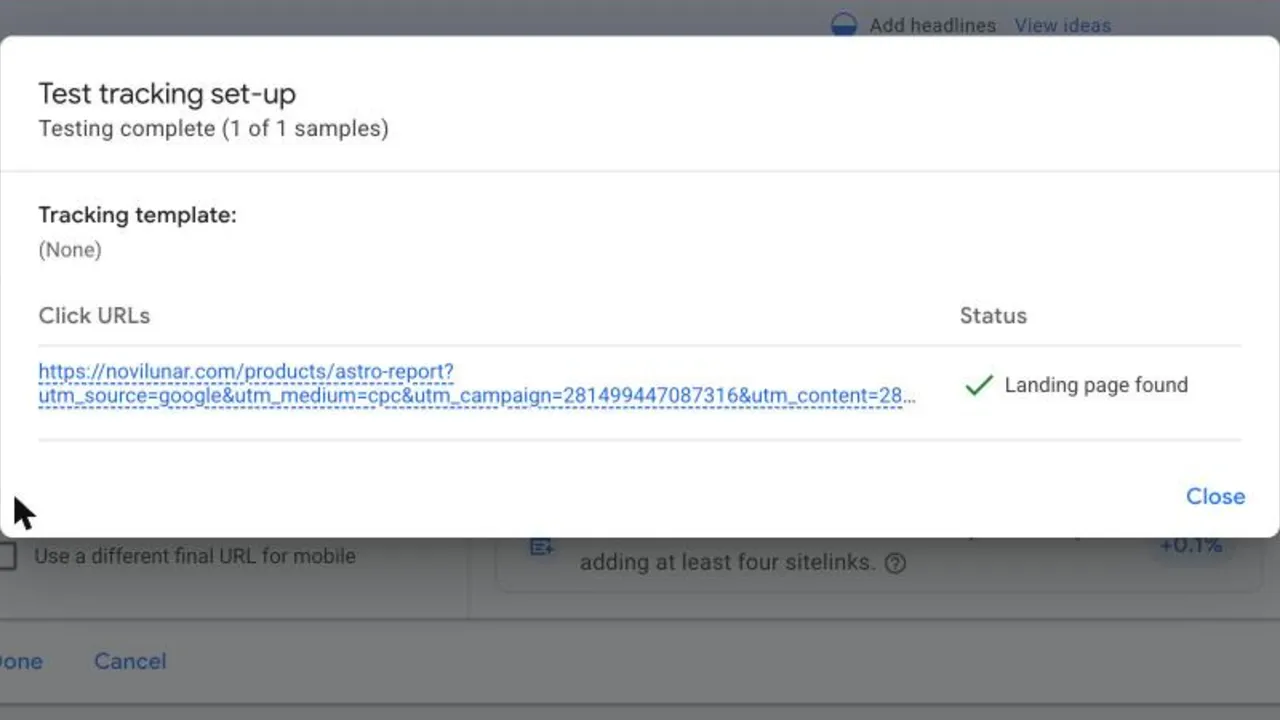
When I tested this in my account, Google built this click URL:
https://novilunar.com/products/astro-report?utm_source=google&utm_medium=cpc&utm_campaign=281499447087316&utm_content=281677879161571&utm_term=
Google added the ? by itself. utm_term is empty in the test because a test click has no real search behind it. On a real click it holds the keyword.
Why IDs and not campaign names? IDs never change. If I rename a campaign from "Shop - US" to "Shop - US - new", every report that used the name splits into two rows. The ID stays the same. The downside is that you have to look up which ID is which campaign. In Google Ads you can add a Campaign ID column to the campaigns table to see them.
Step 4: Test it (and why the Test button may say "No eligible ads found")
There is a Test link under the fields. At account level it can answer No eligible ads found, for example when no ads are running. The test needs a real ad to build a sample click.
The Test that actually works is on the ad:
- Open any ad for editing.
- Click Ad URL options.
- Click Test at the bottom.
A window called Test tracking set-up opens. It shows the full click URL and a status. Landing page found with a green tick means the page loaded. That's the picture at the top of this article.
Don't just look at the green tick. Read the URL. The tick only means the page exists, not that your tags are right.
Step 5 (optional): Add match type and device
If you want more detail per click, you can add two more ValueTrack parameters. They work in the Final URL suffix too:
utm_source=google&utm_medium=cpc&utm_campaign={campaignid}&utm_content={adgroupid}&utm_term={keyword}&matchtype={matchtype}&device={device}
| Part | What it does | Possible values |
|---|---|---|
matchtype={matchtype} | The match type of the keyword that triggered your ad. | e for exact, p for phrase, b for broad |
device={device} | The device of the person who clicked. | m for mobile, t for tablet, c for computer |
matchtype and device are not UTM tags, so GA4 will not put them in a report by itself. Shopify and most CRMs store the full landing URL, so you can still see them there. If you won't look at them, leave them out. Shorter is better. (If you do care about match types, the search terms report is the better place to look anyway. I explain it in how to find and add negative keywords.)
And if you really want it as a tracking template instead, this is the version I tested:
{lpurl}?utm_source=google&utm_medium=cpc&utm_campaign={campaignid}&utm_content={adgroupid}&utm_term={keyword}&matchtype={matchtype}&device={device}
| Part | What it does |
|---|---|
{lpurl} | Google replaces it with your final URL, including the Final URL suffix if you have one. |
? | Starts the list of parameters. Google swaps it for & if the URL already has a ? (more on that below). |
| everything after | The same parameters as in the suffix version. |
The ? and & problem (Google fixes more than people think)
The most common worry in forums: "My final URL already has a ? in it. Will {lpurl}? create a broken URL with two question marks?"
I tested it. I saved {lpurl}?utm_source=google... as the tracking template and ref=suffix as the Final URL suffix, so the final URL already had a ?. Google built:
https://novilunar.com/products/astro-report?ref=suffix&utm_source=google&utm_medium=cpc&...
One ?, then &. Google fixed it. Then I tried it the other way round: {lpurl}&utm_source=google&utm_medium=cpc with no suffix, so there was no ? anywhere. Google built .../astro-report?utm_source=google&utm_medium=cpc. Fixed again.
So right after {lpurl}, Google picks the correct character for you. Use {lpurl}? because that's what Google's own examples use, and stop worrying about it.
What Google does not fix:
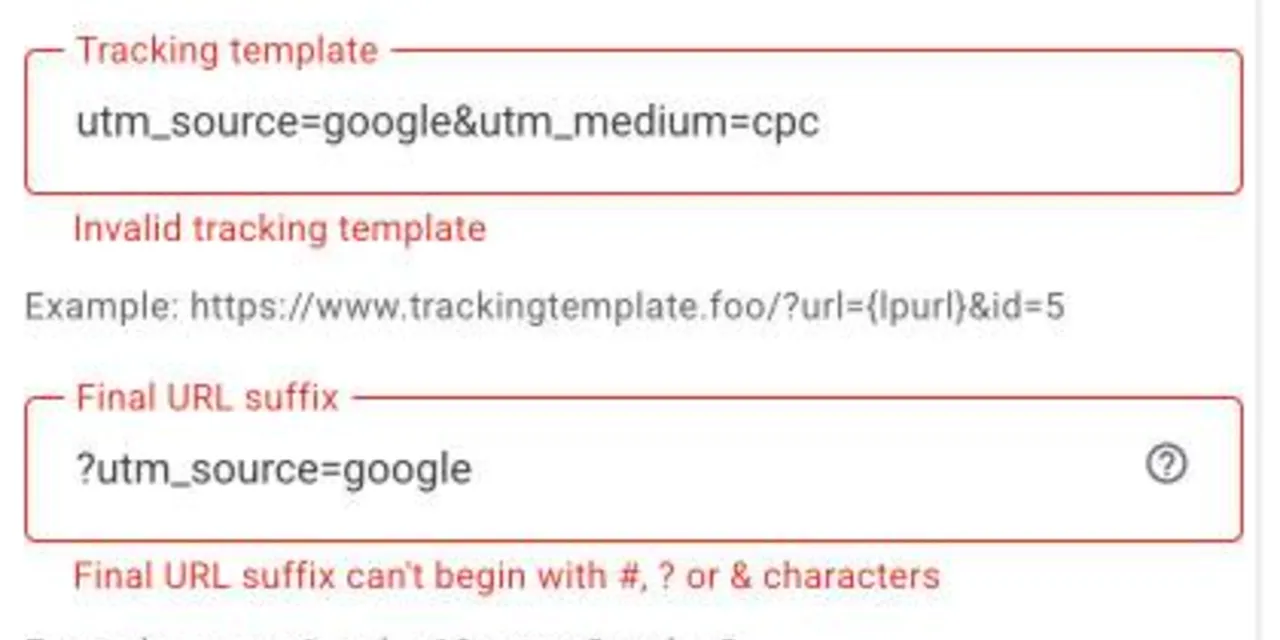
- A Final URL suffix that starts with
?or&. You get the error "Final URL suffix can't begin with #, ? or & characters" and it won't save. - A tracking template without
{lpurl}. You get "Invalid tracking template". People paste UTM tags straight into the template field and hit this. - Duplicate parameters. In one test I had
utm_sourcein both the suffix and the template. Google happily built a URL withutm_source=googletwice. Most tools then read the first one, some read the last one. Put each parameter in one place only.
Which level wins when several are set
You can set a tracking template and a Final URL suffix at several levels:
| Level | Where to find it |
|---|---|
| Account | Admin, Account settings, Tracking |
| Campaign | The campaign's settings, under Campaign URL options (in a new campaign: More settings, then Campaign URL options) |
| Ad group | The ad group's settings, under Ad group URL options |
| Ad | When you edit an ad, under Ad URL options. This is where the working Test button is. |
| Keyword | Per keyword, in the keyword's URL options |
The rule is simple: the most specific level wins, and it replaces, not adds. Keyword beats ad, ad beats ad group, ad group beats campaign, campaign beats account (Google's explanation).
"Replaces" is the trap. If your account has the full UTM suffix and someone adds promo=black-friday as the suffix of one campaign, that campaign loses all its UTM tags. It does not get both. Copy the full suffix down and add your extra parameter to it.
My opinion: set it once at account level and nowhere else. Every campaign you create later is tagged automatically, and you never have to wonder which level is active. Only go lower when one campaign really needs something different.
The campaign and ad levels also have Custom parameters, written like {_promo}. You can ignore them unless you manage a large account. They let you use one template with a different value per campaign.
What about parallel tracking?
You will see a Parallel tracking switch under the fields, labelled For Hotel campaigns. For Search, Shopping, Display, Video and Performance Max, parallel tracking is always on: the visitor goes straight to your page while the tracking happens in the background (Google's explanation). You don't need to do anything. It only matters if you use a third-party click tracker in the tracking template, and then that tool will tell you what it needs.
Frequently asked questions
What is the difference between {lpurl} and {lpurl}? in a tracking template?
{lpurl} is just your final URL. {lpurl}? is your final URL followed by the start of a parameter list. In my tests Google turned that ? into & when the URL already had parameters, so {lpurl}? is the safe default for a template that adds parameters.
Should I use a tracking template or a Final URL suffix for UTM tags?
The Final URL suffix. It's shorter, it can't break your landing page, and Google adds the ? for you. Keep the tracking template for third-party click trackers that ask for one.
Will UTM tags break auto-tagging or my Google Analytics data?
No. With auto-tagging on, GA4 uses the gclid for its normal reports and puts your UTM values in the manual dimensions. Your other tools, like Shopify or your CRM, get the UTM tags they need.
Why does my ValueTrack parameter show up empty?
Some parameters only have a value in some situations. {keyword} is empty in a test click and for campaigns without keywords, such as most of Performance Max. Check the result on a real click before you decide something is broken.
Do I need to set it in every campaign?
No. Set it at account level and every campaign uses it, including new ones. Only set it lower when you want a campaign to behave differently, and remember that a lower level replaces the account setting completely.