How to use Claude for SEO on a Shopify store
By Michal Krkoska13 min read
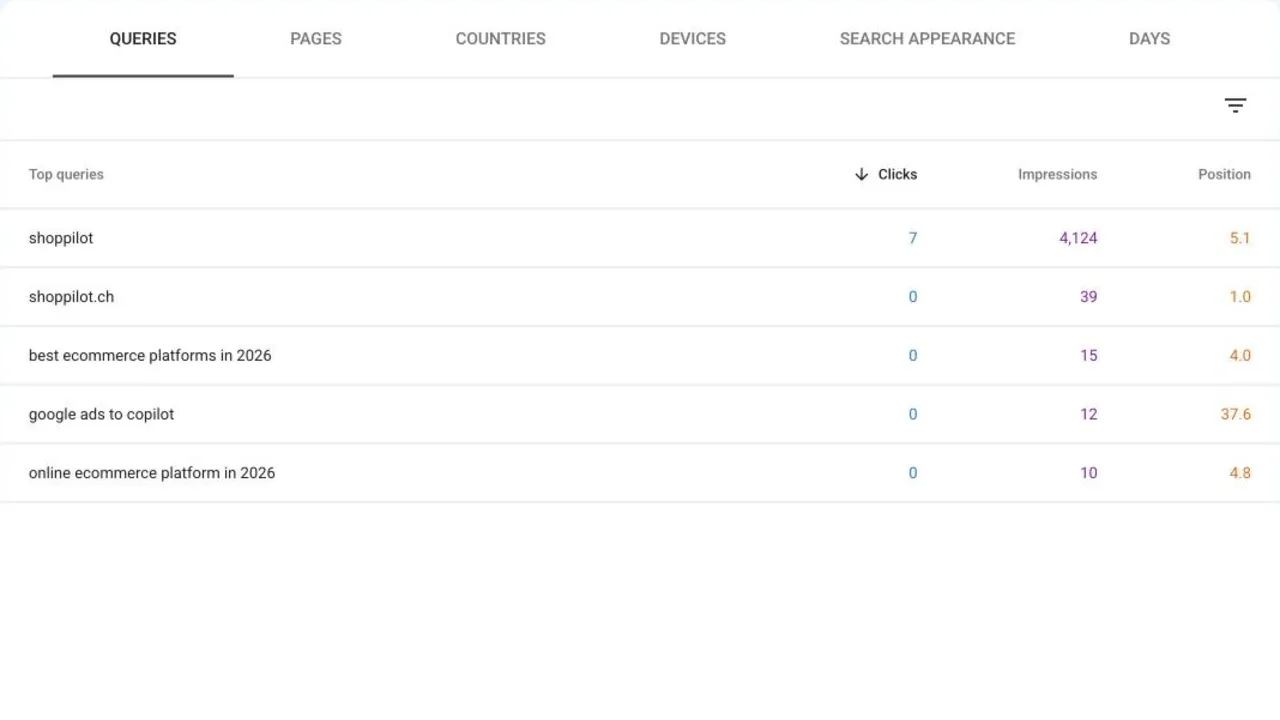
I opened my own Search Console data to find a quick win. The top "opportunities" by impressions were queries at position 35, 37 and 87. That is page four and beyond. One was about a Microsoft product I have never written about.
That is AI for SEO in one paragraph: it reads every row fast and will build a plan on a number it misread. Below are the ways I gave Claude my data, the exact prompts, and where a human has to step in. Setup takes about an hour, then 30 to 45 minutes a week.
I say at the end whether a small store needs a skill or connector. Short answer: no.
Four ways to give Claude your store's data
Claude cannot see Search Console, your Shopify admin or your live pages unless you hand them over. Four ways, simplest first. The capabilities below are as Anthropic's documentation describes them.
| Way | What it is | Good for | Cannot do |
|---|---|---|---|
| Paste or upload an export | You download a report and attach it to a chat. Claude accepts files such as CSV, PDF, JSON and HTML, up to 20 per chat. | Queries, pages, indexing reasons, a product list. | See anything newer than the export, or anything you did not export. |
| A Project with uploaded files | A Project keeps files and instructions that apply to every chat inside it. | Your business brief, your tone rules and last month's export, kept in one place. | Refresh itself. You re-upload data. |
| A connector | A connector links Claude to an outside service through a remote server, so Claude can read live data. | Pulling Search Console data without exporting. | Be trusted blindly. Anthropic says custom connectors are not verified and Claude can read, change or delete data, depending on permissions. |
| Claude in Chrome | An extension that lets Claude read, click and type on websites in your own browser. | Looking at pages and admin screens that have no export, such as a product's search listing. | Be risk free. Anthropic describes it as enhanced with safety classifiers but "still risky". |
A skill is different. Anthropic describes skills as specialized knowledge and workflows, uploaded as a ZIP file with a skill.md file. It teaches Claude a procedure. It does not give Claude your data.
My opinion: start with the first row and stay there until it annoys you.
How I gave Claude the data
- Open Search Console for your site and click Performance.
- Set the range to 3 months and click the Queries tab. Set Rows per page to 250 at the bottom of the table so one page holds every query.
- Click Export at the top right. Google's help page says the export includes the chart and the table, and that values shown as "~" or "-" appear as zeros in the file.
- Repeat on the Pages tab and under Indexing, then Pages.
- For anything with no export, such as a product's head or the Shopify admin, use Claude in Chrome and tell it to look and change nothing.
For this guide I used the data of two of my own sites.
Before any job, give Claude a short brief, or it guesses what you sell. Mine:
I run a small Shopify store that sells digital astrology reports. Customers are beginners who want to learn to read their own birth chart. Prices are in US dollars. I sell only what is on the site: I do not offer printed products, subscriptions or readings by a person. Never invent facts about the products. If you cannot see something, say "I cannot see this" instead of guessing.
The last two sentences matter most.
Job 1: sort the "not indexed" reasons into noise and real problems
Search Console's Indexing, then Pages report lists why URLs are not in Google. Most of it is normal. My guide to the Not indexed list covers each reason. Sorting is the part Claude is good at.
My prompt, with the reasons table attached:
Here are the "Why pages aren't indexed" reasons from Search Console for my Shopify store, with the number of URLs for each. For each reason say: (1) is it usually normal on Shopify, (2) what I should check to be sure, (3) the order I should look at them. Do not tell me to request indexing for anything. Say which reasons you cannot judge without seeing example URLs.
My reasons: Alternative page with proper canonical tag (25), Page with redirect (4), Not found 404 (2), Excluded by "noindex" tag (1), Discovered, currently not indexed (4), Crawled, currently not indexed (2). A good answer, shortened:
- Alternative page with proper canonical tag: normal. This means Google found a copy of a page and chose the main version. Google's own help page says this is not a problem when the canonical points at the right page. The ten examples I opened were all one product page with a long string of characters after a question mark. Noise.
- Page with redirect: usually normal. The redirect target is what gets indexed. Check where each lands.
- Excluded by noindex: check the example. The one URL was a discount link with a redirect parameter. Shopify discount links are not meant to be in Google. Noise.
- Not found (404): real, but the table cannot say what is broken. It needs the example URLs.
- Discovered and Crawled, currently not indexed: the only ones that are about quality. Look at those pages, not the plumbing.
Where it needs you: an old product link nobody visits is not urgent, and only you know which dead links still get traffic. Do not order work by how scary a label sounds. Fixing 404s in Shopify shows the steps, and the canonical guide explains why Shopify makes so many alternate pages.
Job 2: find queries close to page one and improve the title
Prompt, with the Queries export attached:
This is my Search Console query export for 3 months. Find queries where my average position is between 8 and 20 and impressions are meaningful. For each, name the page that ranks, say why the searcher might not click, and suggest one new title for that page. Tell me if there are not enough rows to say anything. Show the numbers you used.
My export holds a trap. The non-brand queries with the most impressions include "connect google ads to copilot" at position 34.8, "google ads to copilot" at 37.6 and "shopware ai copilot" at 86.8. Those are page four and beyond, not page two (about positions 11 to 20), and they are about other products. A model that sorts by impressions will put them first in a "quick wins" list.
So tighten the prompt: "only position 8 to 20, and say which are about my own products." Run strictly, my export has almost nothing: the rows between 11 and 20 have one impression each. The honest answer is "not enough data", so let the prompt allow it.
My best page has 713 impressions and no clicks. A model will say the title is unattractive. But many of its queries are long sentences ending in "in 2026", phrased like a question to a chatbot. I cannot tell who typed them, and neither can Claude. Ask it to separate "what the data shows" from "what might explain it".
The Pages tab has a second trap. My homepage appears as five rows: the page and four more ending in #pricing, #faq, #services and #team. Those are sections of one page. Add a line: "treat URLs that differ only after # as the same page."
My rule, which I gave Claude: with under about 30 impressions, do not rewrite a title for a query.
Job 3: write a page title and meta description from the real product page
I used a real product, a digital report, and Claude in Chrome to read its page and its Search engine listing (open the product in the Shopify admin and scroll to the bottom). Shopify's help allows titles up to 70 characters, says to keep them to 60 or fewer so they are not shortened, and suggests descriptions of about 160.
Prompt:
Read this product page. Write three page titles and two meta descriptions. Use only facts that are on the page. Titles: 60 characters or fewer, include "Novilunar" at the end. Descriptions: 120 to 155 characters. After each one, count the characters with code, not by eye, and show the count.
My first draft title was:
Astrology Beginner Report: Learn to Read Your Natal Chart | Novilunar
It reads fine. The real count is 69, over the 60 I asked for. A model writes by prediction, so counting letters by eye is where it slips. Counting with code and fixing the result gave:
Astrology Beginner Report: Read Your Natal Chart | Novilunar (60 characters) 20-page digital PDF that teaches you to read your own natal chart: planets, signs, houses and aspects. Emailed after purchase. (126 characters)
I checked each fact (20 pages, digital PDF, email delivery) against the page. That is why the prompt says "only facts that are on the page": "personalized" is easy to add and wrong here.
Characters are not what Google measures. Google says a title link is truncated as needed, typically to fit the device width, and that it may rewrite your title. Sixty characters is a safe target, not a guarantee. The clicks for saving it are here.
Job 4: check a page's canonical and structured data
A canonical tag tells Google the main URL when several lead to one page. Structured data is code in the page that states facts such as price and availability.
This job shows what Claude cannot see. When I read my product page as visible text, the way most people would copy it, there was no title, no meta description, no canonical and no structured data in it, because none of those are visible text. An audit of that copy would say "no structured data found". That would be wrong.
Reading the head and the JSON-LD (the format of structured data) with Claude in Chrome showed:
- The title and meta description matched the Shopify admin.
- The canonical pointed at the clean product URL with no parameters.
- The page had Product structured data with a price of 16.95, USD, and an in-stock availability.
- The offer URL in the data included
?variant=with a number, while the canonical did not. A model comparing the two can call this a conflict. On Shopify it is normal, so I left it alone.
Watch generic checklists: this product is a digital file, so advice to add shipping details does not fit. Give Claude the HTML source or the live page.
What Claude does badly
- Search volumes and difficulty. In a plain chat Claude has no live keyword database. Any monthly volume it gives is a guess in a confident voice. Use your Search Console impressions.
- Judging what your customers want. "Best ecommerce platform" may be a buyer or a student. You know your customers from emails, returns and support. It does not.
- Anything it cannot see. Today's rankings, pages behind a login, a page's head, your conversion rate.
- Counting. Characters, words, matching rows. Make it count with code.
- Ordering by importance. It follows alarming labels, not your revenue. The same traps show up in Google Ads: the AI prepares, you decide.
How I check Claude's output before changing a live store
- Check every number against the Search Console row it cites. If the number is not there, discard the answer.
- Check every fact in a title or description against the product page.
- Count characters with code and check Shopify's Search engine listing preview before saving.
- Change a handful of pages, write the date down and wait three to four weeks. Change 40 pages at once and you will not know what worked.
- Keep it read-only. Anthropic says connectors can change or delete data and calls the browser extension risky, so say "look, do not change", and never let it request indexing or remove URLs.
Do you need a skill or a connector?
For a small store, no:
- A weekly export in a chat is enough. The slow part of SEO is deciding which change is worth making, not reading rows.
- A Project is worth it on day two. Put your brief and rules in it ("only facts on the page", "count with code", "treat # URLs as one page"). That is what a skill would give you, but it is yours and readable.
- A skill pays off when you repeat one long procedure often. A third-party skill is instructions and code from a stranger, so read it before installing.
- A connector pays off when exporting is the bottleneck, such as ten sites every Monday. Until then it adds a login and a risk to save two minutes.
- Claude in Chrome is for pages with no export. Use it to look.
How long it takes each week
About 30 to 45 minutes. Export the 28-day Queries and Pages reports and the indexing reasons (5 minutes). Upload them to your Project and ask what changed, with numbers cited (5). Check each cited number (10). Ask for a title and description for one or two pages, counted with code (5). Edit them by hand in Shopify and note the date (10). Then leave them alone. Week one is longer: you write the brief.
Frequently asked questions
Can Claude do an SEO audit of my Shopify store?
It can audit what you give it: an export, the page source, a list of titles. A copy of the visible text gets you an audit of the visible text only. Treat it as things to check.
Do I need a Claude SEO skill?
Not to start with. A Project holding your brief and rules does most of the same job. A skill packages a procedure, it does not provide your data, and anything from a third party deserves a read-through first.
Can Claude tell me how many people search for a keyword?
No. Any volume it gives is a guess. Use your Search Console impressions, or a dedicated keyword tool.
Is it safe to connect Claude to my store or Search Console?
Read-only is the safe setting. Anthropic warns that custom connectors are not verified and that Claude can read, change or delete data depending on the permissions you grant. Give the smallest permission that does the job.